
Properties of Dilations (Triangle)
Loading the math board and drawing, please wait…
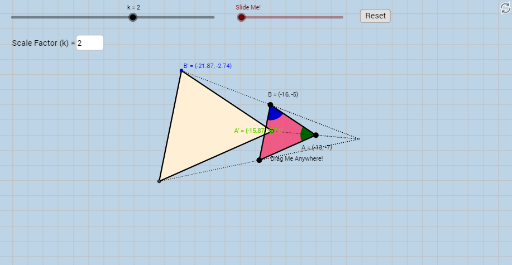
This interactive applet demonstrates the properties of triangle dilation as a similarity transformation. It explores how dilations affect the sides and angles of a triangle, emphasizing the concept of scale factor. Students can manipulate the transformation to informally prove why dilations preserve angle measures and proportionality of side lengths. The construction uses commands like Polygon, Segment, Dilate, Circle, Intersect, and Vector. Ideal for middle school and high school students learning about geometric transformations and similarity.
GeoGebra Commands & Parameters
Polygon(A, B, C) → poly1, c, a, bSegment(A, B) → dSegment(B, C) → eSegment(C, A) → fTextfield(k) → InputBox1Dilate(A, k, O) → A'_5Dilate(B, k, O) → B'_5Dilate(C, k, O) → C'Polygon(A'_5, B'_5, C') → poly1', c', a', b'Dilate(A, k, O) → A'_1Dilate(B, k, O) → B'_1Segment(A'_1, B'_1) → d'Dilate(B, k, O) → B'_2Dilate(C, k, O) → C'_1Segment(B'_2, C'_1) → e'Dilate(C, k, O) → C'_2Dilate(A, k, O) → A'_2Segment(C'_2, A'_2) → f'Segment(O, A'_5) → gSegment(O, A) → hSegment(O, B) → iSegment(O, B'_5) → jSegment(O, C') → lSegment(O, C) → mCircle(A, 1) → pCircle(B, 1) → sIntersect(p, f, 1) → DIntersect(p, d, 1) → EIntersect(s, d, 1) → FIntersect(s, e, 1) → GCircleSector(A, D, E) → tCircleSector(B, F, G) → c_1Dilate(A, If[0 < n ≤ 1, 1 - n, 0], A'_5) → A'_3Dilate(B, If[1 < n ≤ 2, 2 - n, 0], B'_5) → B'_3Vector(B, B'_3) → uVector(A, A'_3) → vTranslate(t, v) → t'Translate(c_1, u) → d_1Angle(D, A, E) → αCircleSector(A, E, D) → e_1CircleSector(B, G, F) → f_1Translate(e_1, v) → g_1Translate(f_1, u) → h_1Dilate(A, If[0 < o ≤ 1, 1 - o, 0], A'_5) → A'_4Vector(A, A'_4) → wDilate(B, If[2 < o ≤ 3, 3 - o, 0], B'_5) → B'_4Vector(B, B'_4) → qTranslate(e_1, w) → rRotate(r, If[1 < o ≤ 2, (((o - 1) * 180))°, 180°], A'_5) → r'Translate(f_1, q) → k_1Rotate(k_1, If[3 < o ≤ 4, (((o - 3) * 180))°, 180°], B'_5) → p_1Translate(t, w) → t'_1Rotate(t'_1, If[1 < o ≤ 2, (((o - 1) * 180))°, 180°], A'_5) → q_1Translate(c_1, q) → r_1Rotate(r_1, If[3 < o ≤ 4, (((o - 3) * 180))°, 180°], B'_5) → s_1Intersect(c', a') → B'Intersect(c', b') → A'Intersect(a', b') → J
AI Drawing Prompt Reference
Draw a triangle and demonstrate its dilation transformation. Start by drawing an original triangle, then dilate it from a center point with a scale factor to create a new triangle. Connect the center point to the vertices of both the original and dilated triangles with line segments. Finally, use circles and sectors to indicate angles and show the relationships between the angles and side lengths before and after dilation to prove it's a similarity transformation.
The prompt above was compiled from the original drawing commands and is for reference only.