
Properties of a Kite by shalverson2021
Loading the math board and drawing, please wait…
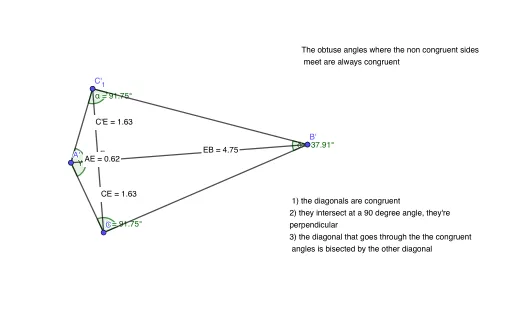
This example demonstrates the geometric properties and calculations of a kite. It involves core math concepts like polygons, angles, vectors, and geometric transformations. Construction highlights include using GeoGebra commands for circles, segments, mirroring, angle measurement, intersection, distance, and midpoint calculations. Suitable for middle school and above students learning geometric constructions and properties exploration.
GeoGebra Commands & Parameters
Circle(A, B) → cSegment(A, B) → fCircle(A, C) → dSegment(A, C) → gSegment(B, C) → hMirror(A, f) → A'Mirror(C, f) → C'Segment(A', C') → g'Mirror(B, f) → B'Mirror(C, f) → C'_1Segment(B', C'_1) → h'Angle(A, C', B) → αAngle(B, C, A) → βAngle(C, A, C') → γAngle(C', B, C) → δSegment(C', C) → iSegment(A, B) → jIntersect(i, j) → EDistance(C', E) → distanceC'EDistance(C, E) → distanceCEDistance(A, E) → distanceAEDistance(E, B) → distanceEBMidpoint(E, B) →
AI Drawing Prompt Reference
Draw a kite ABCD with A and C as the endpoints of the longer sides and B and D as the endpoints of the shorter sides. Use the segment tool to connect A to B, B to C, C to D, and D to A. Mirror point C over the perpendicular bisector of segment AB to get point C', and mirror point A over the perpendicular bisector of segment BC to get point A'. Connect A' to C' and B' to C'. Measure angles A, B, C', and C. Calculate the distances from C' to E, C to E, A to E, and E to B, and find the midpoint of E.
The prompt above was compiled from the original drawing commands and is for reference only.