
Properties of a Kite by Rosalie83
Loading the math board and drawing, please wait…
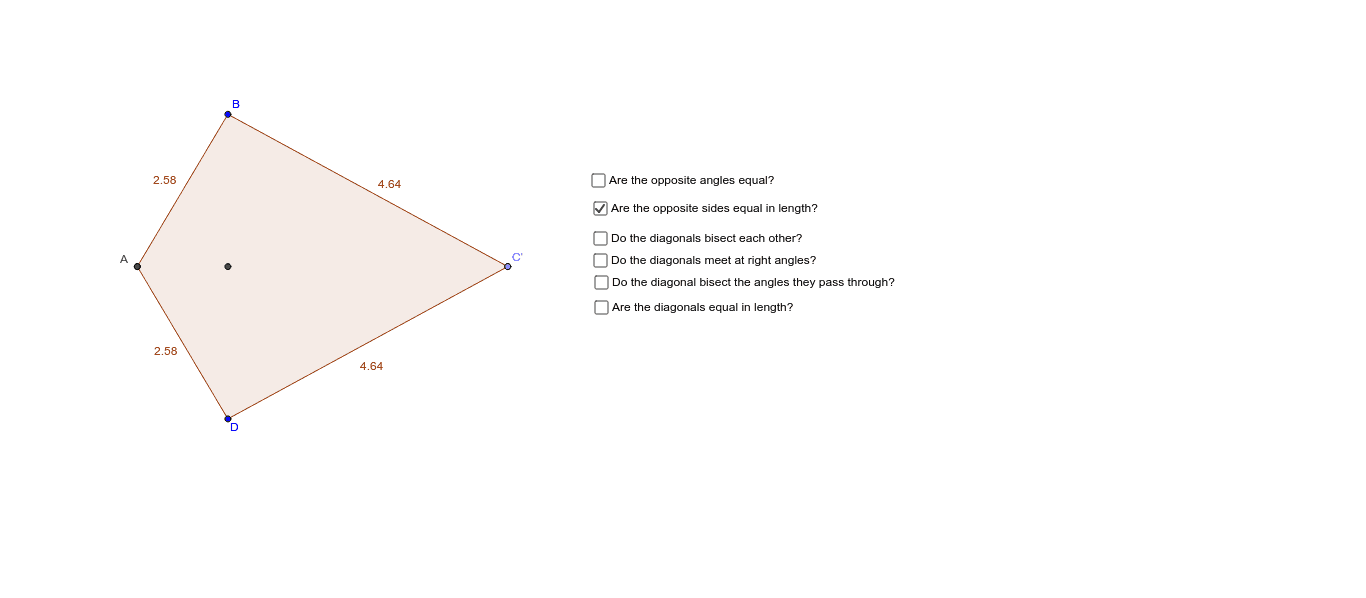
This applet allows you to change the size and shape of a kite by moving points B and C, helping you discover the properties of a kite. Key mathematical concepts include symmetry and diagonal properties of a kite. Commands used include Polygon, Mirror, Angle, and Segment. Suitable for middle school and above students to explore geometric constructions and kite properties.
GeoGebra Commands & Parameters
Intersect(xAxis, yAxis) → APoint(xAxis) → CLine(A, C) → aPolygon(A, B, C) → poly1, c, a_1, bMirror(A, b) → A'Mirror(B, b) → DMirror(C, b) → C'Polygon(A', D, C') → poly1', c', a', b'Polygon(A, B, C, D) → poly2, a_2, b_1, c_1, b'_1Angle(A, B, C) → αAngle(C, D, A) → βAngle(D, A, B) → γAngle(B, C, D) → δSegment(A, C) → fLine(B, D) → gLine(A, C) → hIntersect(a, g) → D_1Segment(B, D_1) → iSegment(D_1, D) → jSegment(A, D_1) → kSegment(D_1, C) → lSegment(B, D_1) → mSegment(D_1, D) → pSegment(D_1, A) → qAngle(C, D_1, B) → εAngle(B, D_1, A) → ζAngle(A, D_1, D) → ηAngle(D, D_1, C) → θAngle(D_1, B, C) → ιAngle(C, D, D_1) → κAngle(D_1, D, A) → λAngle(D, A, D_1) → μAngle(D_1, A, B) → νAngle(A, B, D_1) → ξAngle(B, C, D_1) → οAngle(D_1, C, D) → ρSegment(B, D) → s
AI Drawing Prompt Reference
Draw a kite ABCD and change its shape and size by moving points B and C. Observe the intersection point D1 of diagonals AC and BD, and their relationships with the kite's sides. Draw diagonals AC and BD, connect points A, B, C, and D, measure angles α, β, γ, δ, and line segments f, g, h, i, j, k, l, m, n, p, q, s.
The prompt above was compiled from the original drawing commands and is for reference only.