
Proof of Triangle Numbers Without Words
Loading the math board and drawing, please wait…
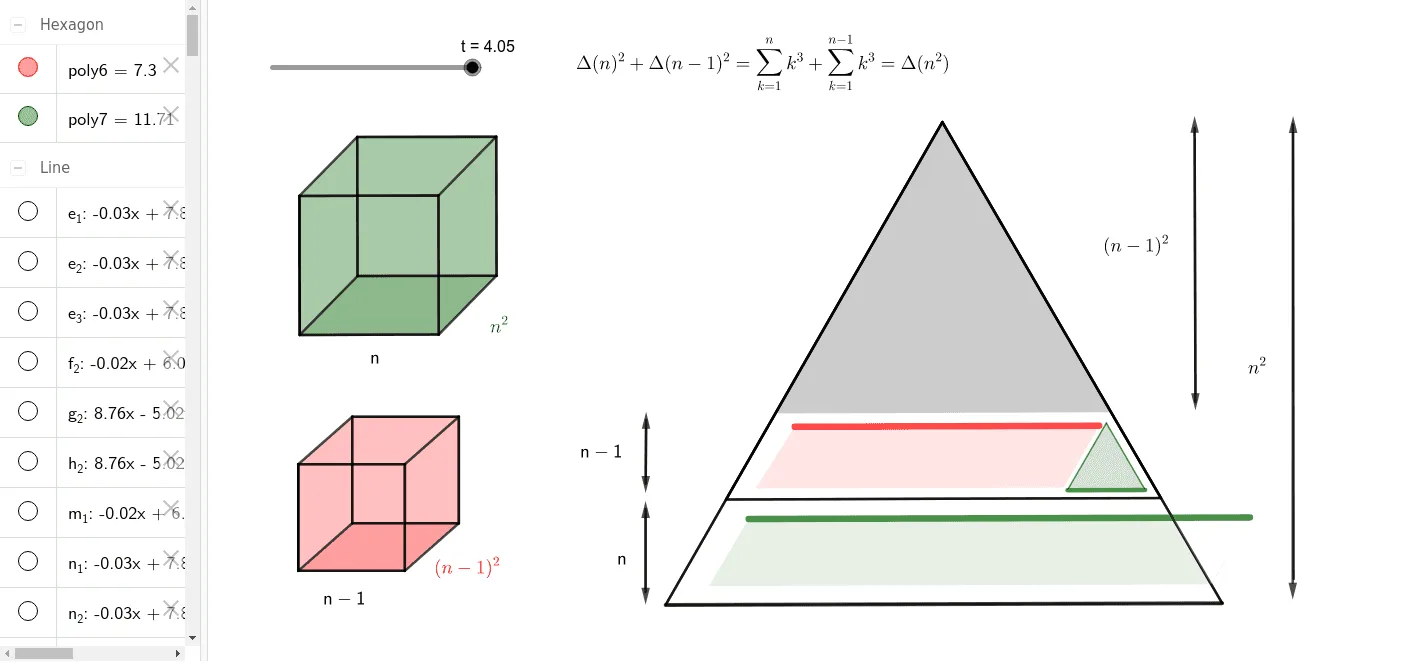
This example demonstrates the properties of triangle numbers through geometric figures. It involves the mathematical concept of sequences. Using GeoGebra commands such as Polygon, Point, Segment, etc., it constructs a series of triangles to illustrate the generation process of triangle numbers. Suitable for middle school and above students to learn sequences and geometric construction.
GeoGebra Commands & Parameters
Polygon(A, B, 3) → poly1, f, g, h, CPoint(poly1) → DPoint(poly1) → EPolygon(A, D, 3) → poly2, i, j, k, FPolygon(A, E, 3) → poly3, l, m, n, GSegment(H, I) → pSegment(H_1, I_1) → p_1Polygon(H, I, 4) → poly4, q, r, s, t_3, J, KPolygon(H_1, I_1, 4) → poly5, a, b, c, d, L, MSegment(H_2, I_2) → p_2Polygon(H_2, I_2, 4) → poly4_1, q_1, r_1, s_1, t_1, J_1, K_1Segment(H_3, I_3) → p_3Polygon(H_3, I_3, 4) → poly5_1, a_1, b_1, c_1, d_1, L_1, M_1Segment(H, H_2) → eSegment(K, K_1) → f_1Segment(I, I_2) → g_1Segment(J, J_1) → h_1Segment(H_1, H_3) → i_1Segment(M, M_1) → j_1Segment(I_1, I_3) → k_1Segment(L, L_1) → l_1Point(f) → NLine(N, j) → m_1Point(f) → OLine(O, m) → n_1Point(n_1) → PPoint(n_1) → QPoint(m_1) → RPoint(m_1) → SLine(T, n_1) → e_1Line(U, m_1) → f_2Line(S, f) → g_2Line(Q, f) → h_2Intersect(g_2, f_2) → VIntersect(h_2, e_1) → WIntersect(g_2, poly1) → Z, A_1Intersect(g_2, e_1) → B_1Polygon(R, U, V, S) → q1, r_2, u, v, s_2Polygon(P, T, W, Q) → q2, p_4, t_2, w, q_2Segment(R, S) → i_2Segment(P, Q) → j_2Intersect(h, q_2) → C_1Intersect(h, t_2) → D_1Polygon(C_1, D_1, Q) → t1, q_3, c_2, d_2Polygon(A_2, B_2, 3) → poly1_1, f_3, g_3, h_3, C_3Point(poly1_1) → D_3Point(poly1_1) → E_1Polygon(A_2, E_1, 3) → poly3_1, l_2, m_2, n_3, G_1Point(f_3) → N_1Point(f_3) → O_1Line(O_1, m_2) → n_2Point(n_2) → P_1Line(T_1, n_2) → e_2Polygon(A_3, B_3, 3) → poly1_2, f_4, g_4, h_5, C_5Point(poly1_2) → D_5Point(poly1_2) → E_2Polygon(A_3, E_2, 3) → poly3_2, l_3, m_3, n_5, G_2Point(f_4) → N_2Point(f_4) → O_2Line(O_2, m_3) → n_4Point(n_4) → P_2Line(T_2, n_4) → e_3Polygon(C_1, D_1, Q) → t2, q_4, c_3, d_3Rotate(C_1, (3 * (t - 3)), S_1) → F_1Rotate(D_1, (3 * (t - 3)), S_1) → Q_1Rotate(Q, (3 * (t - 3)), S_1) → Q'Polygon(F_1, Q_1, Q') → t2', q', f_5, q_5Polygon(I_2, I, J, J_1) → q3, i_3, i_4, j_3, j_4Polygon(I_1, L, L_1, I_3) → q4, i_5, l_4, l_5, i_6Polygon(H_1, I_1, L, L_1, M_1, H_3) → poly6, h_4, i_7, l_6, l_7, m_4, h_6Polygon(H, I, J, J_1, K_1, H_2) → poly7, h_7, i_8, j_5, j_6, k_2, h_8Vector(R_1, U_1) → u_1Point(u_1) → V_1Vector(V_1, W_1) → w_1Vector(R_2, U_2) → u_2Vector(Z_1, C_2) → v_1Point(v_1) → D_2Vector(D_2, F_2) → v_2Vector(Z_2, C_4) → v_4Vector(J_2, K_2) → w_2Point(w_2) → L_2Vector(L_2, M_2) → a_2Vector(R_3, U_3) → u_3Point(u_3) → V_2Vector(V_2, W_2) → w_3Vector(R_4, U_4) → u_4Point(u_4) → V_3
AI Drawing Prompt Reference
Draw a geometric figure to demonstrate the properties of triangle numbers by constructing a series of triangles to illustrate the generation process. Start with a triangle and progressively add new triangles based on it, forming multiple levels of geometric structures. Connect key points with line segments to create several quadrilaterals and new triangles. Finally, add some auxiliary line segments and intersection points to emphasize the mathematical properties of triangle numbers.
The prompt above was compiled from the original drawing commands and is for reference only.