
Problem Solving with Parallel and Perpendicular Lines
Loading the math board and drawing, please wait…
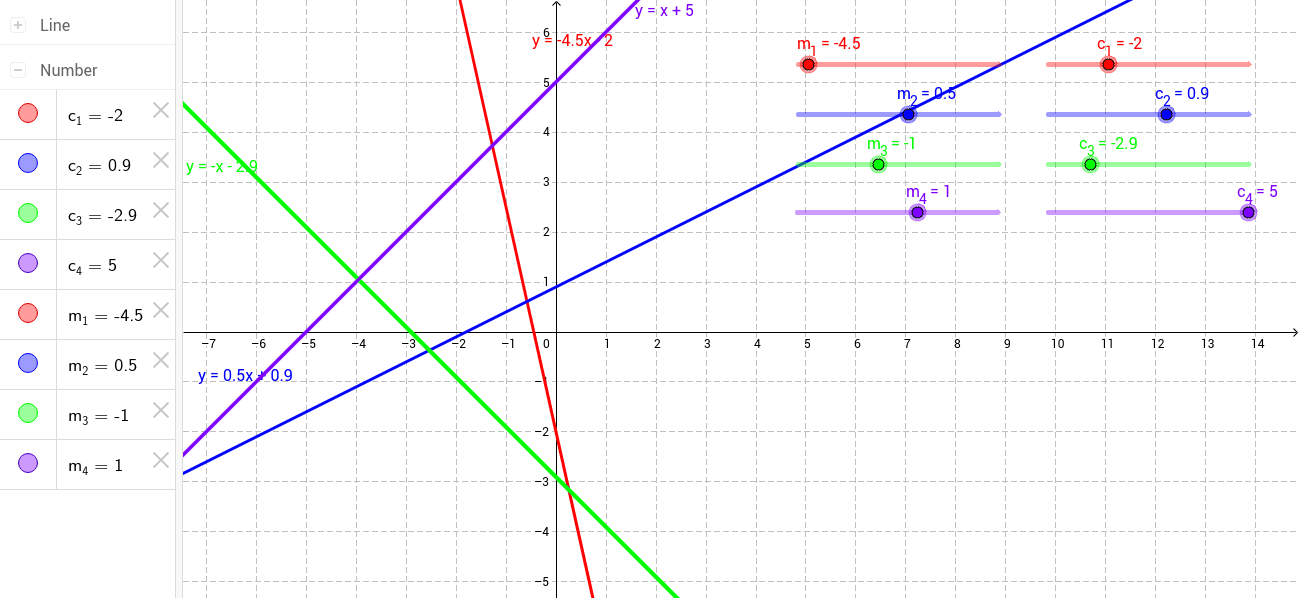
This example demonstrates how to use GeoGebra to draw parallel and perpendicular lines and solve related mathematical problems. The core math concepts involved include equations, straight lines, upper and lower sum or Riemann sum, Pythagoras or Pythagorean Theorem, inequalities, step functions, and linear programming or linear optimization. The construction highlights the use of GeoGebra commands and objects such as m_1, c_1, a, m_2, c_2, b, m_3, c_3, c, m_4, c_4, d. It is suitable for high school students learning coordinate geometry.
GeoGebra Commands & Parameters
Numeric m_1(-4.5)Numeric c_1(-2)y = (m_1 * x) + c_1Numeric m_2(0.5)Numeric c_2(0.9)y = (m_2 * x) + c_2Numeric m_3(-1)Numeric c_3(-2.9)y = (m_3 * x) + c_3Numeric m_4(1)Numeric c_4(5)y = (m_4 * x) + c_4
AI Drawing Prompt Reference
Draw four straight lines with different slopes, colored distinctly, and label their slopes and intercepts, demonstrating the construction of parallel and perpendicular lines for high school coordinate geometry learning.
The prompt above was compiled from the original drawing commands and is for reference only.