
Probability with Random Ball Selection: Shuffling and Color Combinations
Loading the math board and drawing, please wait…
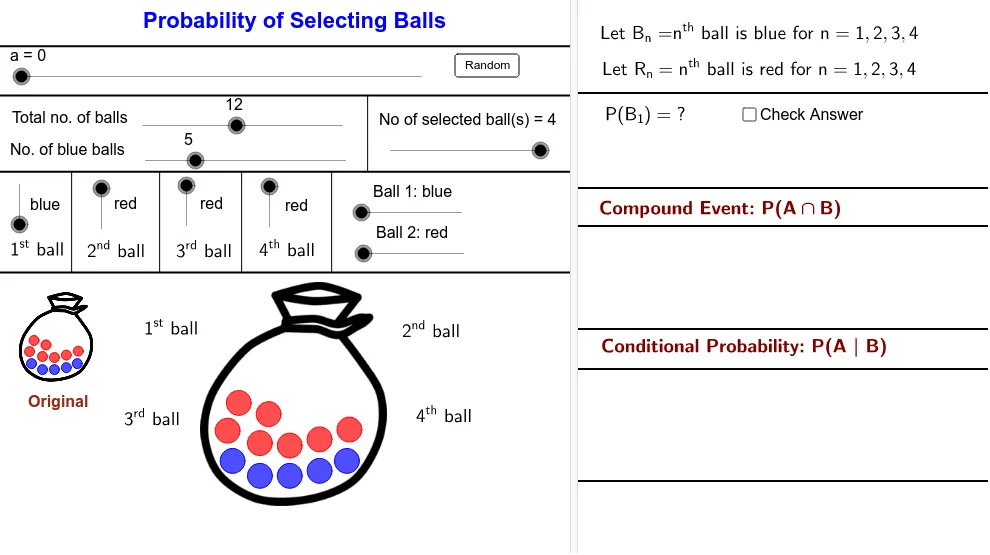
This example demonstrates how random ball selection from a set of colored balls can be visualized to reveal the outcomes and their probability patterns. It centers on core ideas in Probability & Statistics, especially random experiments and equally likely selections, together with Combinatorics for counting/selection logic. Visually, it uses points/segments to place balls around circular or spherical diagram components and uses interactive controls to update the experiment. Construction highlights from the provided GeoGebra summary: Sequence is used to generate index sequences, Shuffle randomizes the order of candidates, If applies selection rules to determine which indices are chosen, and Point/Segment create the geometric placement and connecting visual structure. Collections such as BallBlueList01/BallRedList01 and their randomized counterparts (BlueRandomList/RedRandomList), along with SelectedColourNoList and SelectNoList, store selected indices and color-specific results while variables like NoB and NoS control the total number of balls and the number selected. Suitable for high-school and early undergraduate teaching and self-study on turning a probability problem into a dynamic model that students can experiment with.
GeoGebra Commands & Parameters
Sequence(Circle[Element[Centre00, i], BallRadius], i, 2, NoB + 1) → BallBlueList01Sequence(Circle[Element[Centre00, i], BallRadius], i, NoB + 2, nb + 1) → BallRedList01Sequence(i, i, 2, NoB + 1) → BlueListSequence(i, i, NoB + 2, nb + 1) → RedListShuffle(BlueList) → BlueRandomListShuffle(RedList) → RedRandomListSequence(If[Element[SelectedColourNoList, i] ≟ 1, Element[BlueRandomList, i], Element[RedRandomList, i]], i, 1, NoS) → SelectNoListSequence(Circle[Element[Centre001, i], BallRadiusSmall], i, 2, NoB + 1) → BallBlueList001Sequence(Circle[Element[Centre001, i], BallRadiusSmall], i, NoB + 2, nb + 1) → BallRedList001Sequence(Element[Centre00, Element[SelectNoList, i]], i, 1, NoS) → MoveStartIf(a < 5, Element[MoveStart, 1], If[a > 15, C01, (FindCor(a, 5, 15, x(Element[MoveStart, 1]), x(C01)), FindCor(a, 5, 15, y(Element[MoveStart, 1]), y(C01)))]) → C01MoveIf(a < 25, Element[MoveStart, 2], If[a > 35, C02, (FindCor(a, 25, 35, x(Element[MoveStart, 2]), x(C02)), FindCor(a, 25, 35, y(Element[MoveStart, 2]), y(C02)))]) → C02MoveIf(a < 45, Element[MoveStart, 3], If[a > 55, C03, (FindCor(a, 45, 55, x(Element[MoveStart, 3]), x(C03)), FindCor(a, 45, 55, y(Element[MoveStart, 3]), y(C03)))]) → C03MoveIf(a < 65, Element[MoveStart, 4], If[a > 75, C04, (FindCor(a, 65, 75, x(Element[MoveStart, 4]), x(C04)), FindCor(a, 65, 75, y(Element[MoveStart, 4]), y(C04)))]) → C04MoveSequence(If[Element[SelectedColourNoList, i] ≟ 1, Circle[Element[MoveCentre, i], BallRadius]], i, 1, NoS) → BallBlueSelectedListSequence(If[Element[SelectedColourNoList, i] ≟ 2, Circle[Element[MoveCentre, i], BallRadius]], i, 1, NoS) → BallRedSelectedListSequence(Circle[Element[MoveStart, i], (Lfactor * BallRadius)], i, 1, NoS) → WhiteCircleListIf(Ball01 ≟ 1, NoOfBlue00 - 1, NoOfBlue00) → NoOfBlue01If(Ball02 ≟ 1, NoOfBlue01 - 1, NoOfBlue01) → NoOfBlue02If(Ball03 ≟ 1, NoOfBlue02 - 1, NoOfBlue02) → NoOfBlue03If(Ball04 ≟ 1, NoOfBlue03 - 1, NoOfBlue03) → NoOfBlue04If(Ball01 ≟ 2, NoOfRed00 - 1, NoOfRed00) → NoOfRed01If(Ball02 ≟ 2, NoOfRed01 - 1, NoOfRed01) → NoOfRed02If(Ball03 ≟ 2, NoOfRed02 - 1, NoOfRed02) → NoOfRed03If(Ball04 ≟ 2, NoOfRed03 - 1, NoOfRed03) → NoOfRed04Sequence(If[Element[SelectedColourNoList, i] ≟ 1, Element[NoOfBlue, i], Element[NoOfRed, i]], i, 1, NoS + 1) → NoOfBallNumeratorPoint(d) → Z06Point(c) → Z05Segment(Z05, Y05) → mSegment(Z06, Y06) → kPoint(d) → Z07Point(d) → Z08Point(d) → Z09Segment(Z07, Y07) → nSegment(Z08, Y08) → pSegment(Z09, Y09) → q
AI Drawing Prompt Reference
Create a visual for a probability experiment: arrange several blue and red balls evenly around a circular area, randomly shuffle and select a few, then move the selected balls to another set of circular positions, marking them with small white circles. Include two sets of rings (large and small) for initial and final positions, connect relevant points with segments to show the selection process, and display counts of selected balls by color. Add a slider to animate the movement and color changes step by step.
The prompt above was compiled from the original drawing commands and is for reference only.