
Probability: Selecting Balls by ELMOUTTAKI AYOUB
Loading the math board and drawing, please wait…
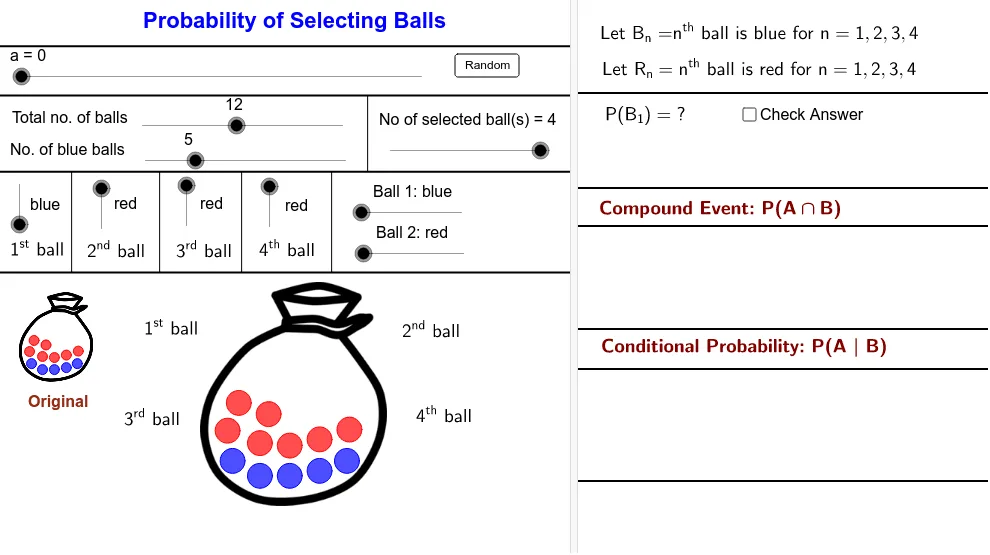
This example demonstrates the probability of selecting balls. Core mathematical concepts include probability calculation and random selection. Using GeoGebra commands such as Sequence, Shuffle, and If, a dynamic ball selection model is constructed. Suitable for middle school and above students to learn probability and statistics.
GeoGebra Commands & Parameters
Sequence(Circle[Element[Centre00, i], BallRadius], i, 2, NoB + 1) → BallBlueList01Sequence(Circle[Element[Centre00, i], BallRadius], i, NoB + 2, nb + 1) → BallRedList01Sequence(i, i, 2, NoB + 1) → BlueListSequence(i, i, NoB + 2, nb + 1) → RedListShuffle(BlueList) → BlueRandomListShuffle(RedList) → RedRandomListSequence(If[Element[SelectedColourNoList, i] ≟ 1, Element[BlueRandomList, i], Element[RedRandomList, i]], i, 1, NoS) → SelectNoListSequence(Circle[Element[Centre001, i], BallRadiusSmall], i, 2, NoB + 1) → BallBlueList001Sequence(Circle[Element[Centre001, i], BallRadiusSmall], i, NoB + 2, nb + 1) → BallRedList001Sequence(Element[Centre00, Element[SelectNoList, i]], i, 1, NoS) → MoveStartIf(a < 5, Element[MoveStart, 1], If[a > 15, C01, (FindCor(a, 5, 15, x(Element[MoveStart, 1]), x(C01)), FindCor(a, 5, 15, y(Element[MoveStart, 1]), y(C01)))]) → C01MoveIf(a < 25, Element[MoveStart, 2], If[a > 35, C02, (FindCor(a, 25, 35, x(Element[MoveStart, 2]), x(C02)), FindCor(a, 25, 35, y(Element[MoveStart, 2]), y(C02)))]) → C02MoveIf(a < 45, Element[MoveStart, 3], If[a > 55, C03, (FindCor(a, 45, 55, x(Element[MoveStart, 3]), x(C03)), FindCor(a, 45, 55, y(Element[MoveStart, 3]), y(C03)))]) → C03MoveIf(a < 65, Element[MoveStart, 4], If[a > 75, C04, (FindCor(a, 65, 75, x(Element[MoveStart, 4]), x(C04)), FindCor(a, 65, 75, y(Element[MoveStart, 4]), y(C04)))]) → C04MoveSequence(If[Element[SelectedColourNoList, i] ≟ 1, Circle[Element[MoveCentre, i], BallRadius]], i, 1, NoS) → BallBlueSelectedListSequence(If[Element[SelectedColourNoList, i] ≟ 2, Circle[Element[MoveCentre, i], BallRadius]], i, 1, NoS) → BallRedSelectedListSequence(Circle[Element[MoveStart, i], (Lfactor * BallRadius)], i, 1, NoS) → WhiteCircleListIf(Ball01 ≟ 1, NoOfBlue00 - 1, NoOfBlue00) → NoOfBlue01If(Ball02 ≟ 1, NoOfBlue01 - 1, NoOfBlue01) → NoOfBlue02If(Ball03 ≟ 1, NoOfBlue02 - 1, NoOfBlue02) → NoOfBlue03If(Ball04 ≟ 1, NoOfBlue03 - 1, NoOfBlue03) → NoOfBlue04If(Ball01 ≟ 2, NoOfRed00 - 1, NoOfRed00) → NoOfRed01If(Ball02 ≟ 2, NoOfRed01 - 1, NoOfRed01) → NoOfRed02If(Ball03 ≟ 2, NoOfRed02 - 1, NoOfRed02) → NoOfRed03If(Ball04 ≟ 2, NoOfRed03 - 1, NoOfRed03) → NoOfRed04Sequence(If[Element[SelectedColourNoList, i] ≟ 1, Element[NoOfBlue, i], Element[NoOfRed, i]], i, 1, NoS + 1) → NoOfBallNumeratorPoint(d) → Z06Point(c) → Z05Segment(Z05, Y05) → mSegment(Z06, Y06) → kPoint(d) → Z07Point(d) → Z08Point(d) → Z09Segment(Z07, Y07) → nSegment(Z08, Y08) → pSegment(Z09, Y09) → q
AI Drawing Prompt Reference
Draw a circle with 20 blue balls and 15 red balls. Randomly select some balls and move them according to the selection order. Finally, calculate and display the remaining number of blue and red balls.
The prompt above was compiled from the original drawing commands and is for reference only.