
Polygonal Numbers
Loading the math board and drawing, please wait…
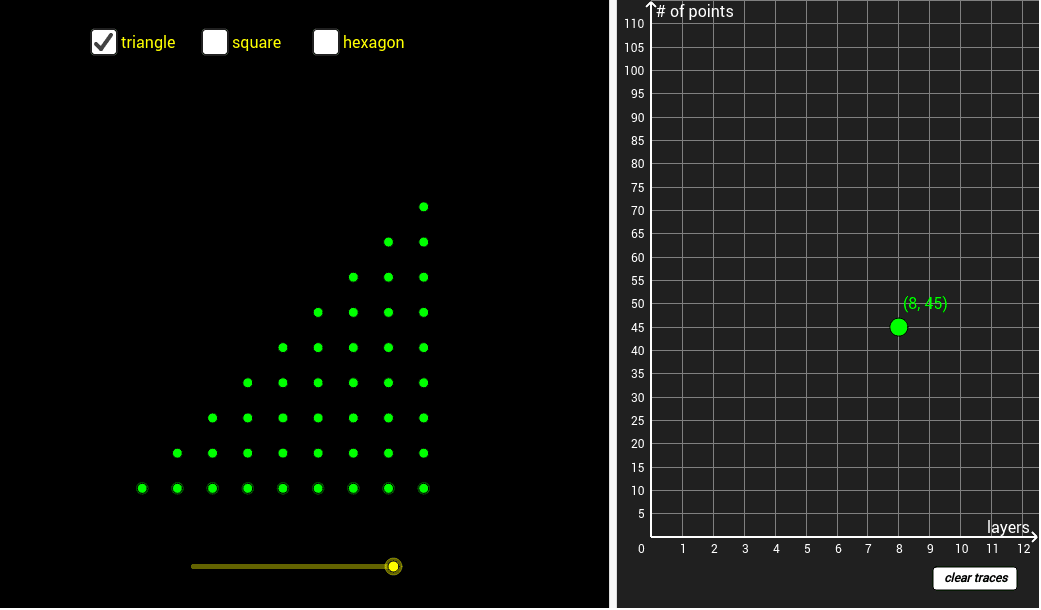
This GeoGebra example visually demonstrates the construction of polygonal numbers, where numbers are represented as dots arranged in polygonal shapes. It employs the Sequence command to generate ordered points, the Polygon command to connect them into geometric figures, and dynamic objects to explore numerical patterns. Core mathematical concepts include number sequences, polygonal number formulas, and geometric reasoning. It is suitable for high school mathematics, particularly in number theory and geometry integration, and serves as an effective tool for exploratory learning and visualizing abstract numerical relationships.
GeoGebra Commands & Parameters
Sequence((kk, 0), kk, 0, k) → list1Sequence(Sequence[(kk, p), kk, 0, k], p, 0, k) → list2Sequence(Sequence[(kk, mm), mm, 0, kk], kk, 0, k) → list3Point(yAxis) → CPoint(yAxis) → DPoint(xAxis) → HPolygon(C, D, E, F, G, H) → poly1, c, d, e, f, g, hPoint(yAxis) → IPoint(xAxis) → QPolygon(C, D, Q, H, I, J, K, L, M, N, O, P) → poly2, c_1, p_1, q, h_1, d_1, i, j, k_1, l, m, n, oPoint(yAxis) → RPoint(xAxis) → F_1Polygon(C, D, A_1, B_1, C_1, D_1, E_1, F_1, Q, H, I, R, S, T, U, V, W, Z) → poly3, c_2, z_1, a_1, b_1, c_3, d_3, e_1, f_1, q_1, h_2, d_2, i_1, r, s, t, u, v, w
AI Drawing Prompt Reference
Create a visual diagram of polygonal numbers using dot arrays. Start by placing a row of equally spaced dots along the horizontal axis, then add rows above with increasing dot counts to form a triangular lattice. Place several key points on the axes and connect them with straight lines to outline polygons of increasing sides—triangle, hexagon, and decagon—each enclosing the corresponding dot pattern. The layout should clearly show how the dots expand with the polygon's side count, emphasizing the relationship between numbers and geometric shapes.
The prompt above was compiled from the original drawing commands and is for reference only.