
Polygon Rotation and Construction Demo
Loading the math board and drawing, please wait…
In collections
Phebe Tanner Tessellation Rotation
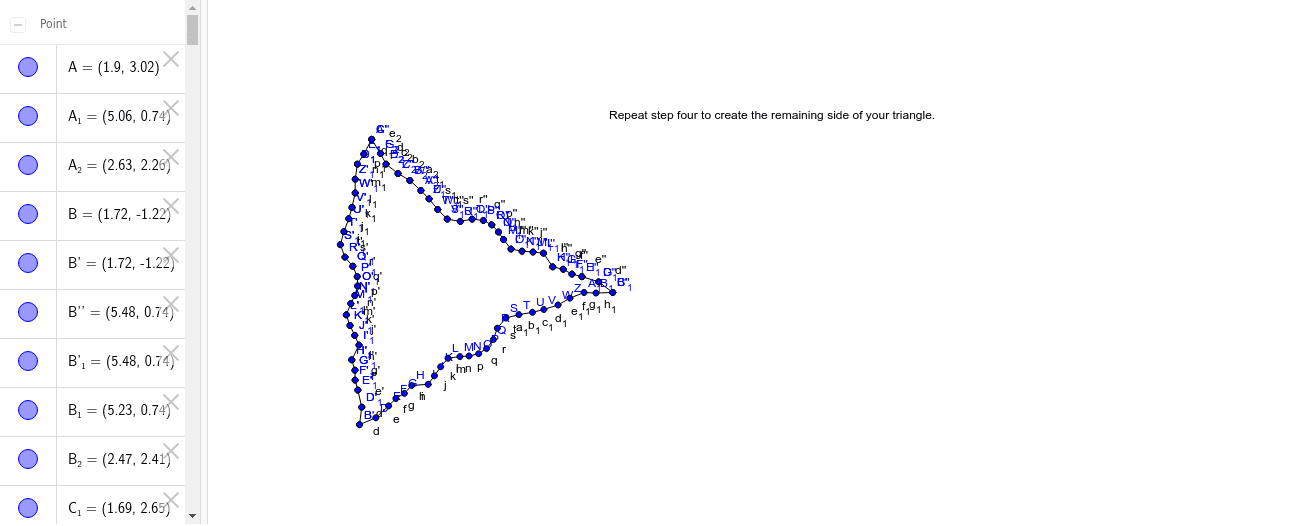
This example demonstrates how to construct new shapes by rotating polygons and observing their transformation patterns. Key math concepts include polygons, rotation, volume calculation, function graphing, trigonometric applications, and percentage change analysis. The construction highlights the use of GeoGebra commands like Polygon, Segment, and Rotate, as detailed in the summary. Suitable for high school mathematics education, integrating geometric construction, function graphs, and transformation concepts for visual learning.
GeoGebra Commands & Parameters
Polygon(A, B, 3) → poly1, a, b, c, CSegment(B, D) → dSegment(D, E) → eSegment(E, F) → fSegment(F, G) → gSegment(G, H) → hSegment(H, I) → iSegment(I, J) → jSegment(J, K) → kSegment(K, L) → lSegment(L, M) → mSegment(M, N) → nSegment(N, O) → pSegment(O, P) → qSegment(P, Q) → rSegment(Q, R) → sSegment(R, S) → tSegment(S, T) → a_1Segment(T, U) → b_1Segment(U, V) → c_1Segment(V, W) → d_1Segment(W, Z) → e_1Segment(Z, A_1) → f_1Segment(A_1, B_1) → g_1Segment(B_1, C) → h_1Rotate(B, 60*°, B) → B'Rotate(D, 60*°, B) → D'Segment(B', D') → d'Rotate(D, 60*°, B) → D'_1Rotate(E, 60*°, B) → E'Segment(D'_1, E') → e'Rotate(E, 60*°, B) → E'_1Rotate(F, 60*°, B) → F'Segment(E'_1, F') → f'Rotate(F, 60*°, B) → F'_1Rotate(G, 60*°, B) → G'Segment(F'_1, G') → g'Rotate(G, 60*°, B) → G'_1Rotate(H, 60*°, B) → H'Segment(G'_1, H') → h'Rotate(H, 60*°, B) → H'_1Rotate(I, 60*°, B) → I'Segment(H'_1, I') → i'Rotate(I, 60*°, B) → I'_1Rotate(J, 60*°, B) → J'Segment(I'_1, J') → j'Rotate(J, 60*°, B) → J'_1Rotate(K, 60*°, B) → K'Segment(J'_1, K') → k'Rotate(K, 60*°, B) → K'_1Rotate(L, 60*°, B) → L'Segment(K'_1, L') → l'Rotate(L, 60*°, B) → L'_1Rotate(M, 60*°, B) → M'Segment(L'_1, M') → m'Rotate(M, 60*°, B) → M'_1Rotate(N, 60*°, B) → N'Segment(M'_1, N') → n'Rotate(N, 60*°, B) → N'_1Rotate(O, 60*°, B) → O'Segment(N'_1, O') → p'Rotate(O, 60*°, B) → O'_1Rotate(P, 60*°, B) → P'Segment(O'_1, P') → q'Rotate(P, 60*°, B) → P'_1Rotate(Q, 60*°, B) → Q'Segment(P'_1, Q') → r'Rotate(Q, 60*°, B) → Q'_1Rotate(R, 60*°, B) → R'Segment(Q'_1, R') → s'Rotate(R, 60*°, B) → R'_1Rotate(S, 60*°, B) → S'Segment(R'_1, S') → t'Rotate(S, 60*°, B) → S'_1Rotate(T, 60*°, B) → T'Segment(S'_1, T') → i_1Rotate(T, 60*°, B) → T'_1Rotate(U, 60*°, B) → U'Segment(T'_1, U') → j_1Rotate(U, 60*°, B) → U'_1Rotate(V, 60*°, B) → V'Segment(U'_1, V') → k_1Rotate(V, 60*°, B) → V'_1Rotate(W, 60*°, B) → W'Segment(V'_1, W') → l_1Rotate(W, 60*°, B) → W'_1Rotate(Z, 60*°, B) → Z'Segment(W'_1, Z') → m_1Rotate(Z, 60*°, B) → Z'_1Rotate(A_1, 60*°, B) → C_1Segment(Z'_1, C_1) → n_1Rotate(A_1, 60*°, B) → D_1Rotate(B_1, 60*°, B) → E_1Segment(D_1, E_1) → p_1Rotate(B_1, 60*°, B) → F_1Rotate(C, 60*°, B) → C'Segment(F_1, C') → q_1Rotate(B', 60*°, A) → B''Rotate(D', 60*°, A) → D''Segment(B'', D'') → d''Rotate(D'_1, 60*°, A) → G_1Rotate(E', 60*°, A) → E''Segment(G_1, E'') → e''Rotate(E'_1, 60*°, A) → H_1Rotate(F', 60*°, A) → F''Segment(H_1, F'') → f''Rotate(F'_1, 60*°, A) → I_1Rotate(G', 60*°, A) → G''Segment(I_1, G'') → g''Rotate(G'_1, 60*°, A) → J_1Rotate(H', 60*°, A) → H''Segment(J_1, H'') → h''Rotate(H'_1, 60*°, A) → K_1Rotate(I', 60*°, A) → I''Segment(K_1, I'') → i''Rotate(I'_1, 60*°, A) → L_1Rotate(J', 60*°, A) → J''Segment(L_1, J'') → j''Rotate(J'_1, 60*°, A) → M_1Rotate(K', 60*°, A) → K''Segment(M_1, K'') → k''Rotate(K'_1, 60*°, A) → N_1Rotate(L', 60*°, A) → L''Segment(N_1, L'') → l''Rotate(L'_1, 60*°, A) → O_1Rotate(M', 60*°, A) → M''Segment(O_1, M'') → m''Rotate(M'_1, 60*°, A) → P_1Rotate(N', 60*°, A) → N''Segment(P_1, N'') → n''Rotate(N'_1, 60*°, A) → Q_1Rotate(O', 60*°, A) → O''Segment(Q_1, O'') → p''Rotate(O'_1, 60*°, A) → R_1Rotate(P', 60*°, A) → P''Segment(R_1, P'') → q''Rotate(P'_1, 60*°, A) → S_1Rotate(Q', 60*°, A) → Q''Segment(S_1, Q'') → r''Rotate(Q'_1, 60*°, A) → T_1Rotate(R', 60*°, A) → R''Segment(T_1, R'') → s''Rotate(R'_1, 60*°, A) → U_1Rotate(S', 60*°, A) → S''Segment(U_1, S'') → t''Rotate(S'_1, 60*°, A) → V_1Rotate(T', 60*°, A) → T''Segment(V_1, T'') → r_1Rotate(T'_1, 60*°, A) → W_1Rotate(U', 60*°, A) → U''Segment(W_1, U'') → s_1Rotate(U'_1, 60*°, A) → Z_1Rotate(V', 60*°, A) → V''Segment(Z_1, V'') → t_1Rotate(V'_1, 60*°, A) → A_2Rotate(W', 60*°, A) → W''Segment(A_2, W'') → a_2Rotate(W'_1, 60*°, A) → B_2Rotate(Z', 60*°, A) → Z''Segment(B_2, Z'') → b_2Rotate(Z'_1, 60*°, A) → C_2Rotate(C_1, 60*°, A) → D_2Segment(C_2, D_2) → c_2Rotate(D_1, 60*°, A) → E_2Rotate(E_1, 60*°, A) → F_2Segment(E_2, F_2) → d_2Rotate(F_1, 60*°, A) → G_2Rotate(C', 60*°, A) → C''Segment(G_2, C'') → e_2Rotate(B, 60*°, A) → B'_1
AI Drawing Prompt Reference
Draw a regular polygon with multiple sides, then rotate it around one vertex by 60 degrees to create multiple rotated copies, showing the transformation pattern.
The prompt above was compiled from the original drawing commands and is for reference only.