
Polar Form of Complex Numbers - Section 7.2
Loading the math board and drawing, please wait…
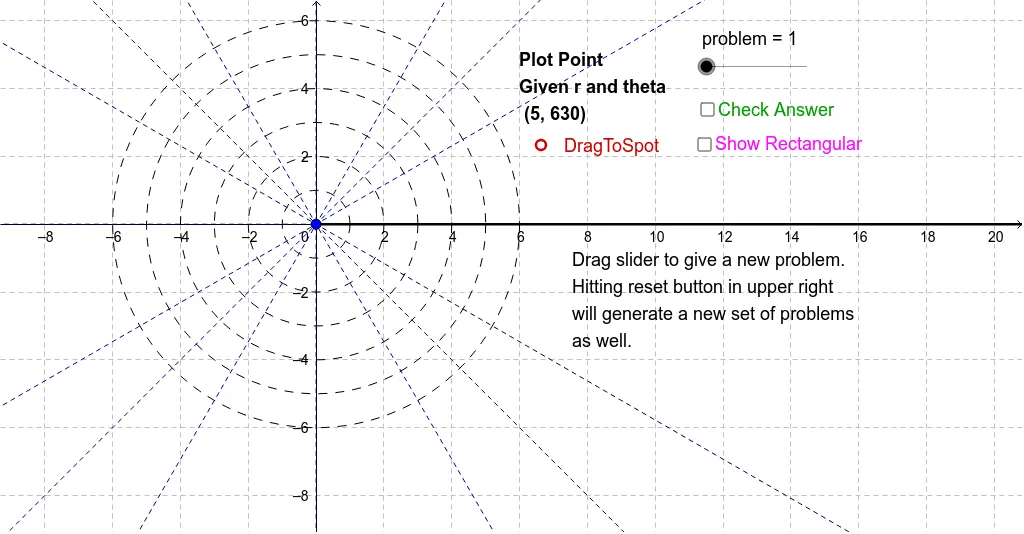
① This example demonstrates converting complex numbers from polar form (magnitude and argument) to rectangular form (real and imaginary parts), using dynamic graphics to visualize the representation on the complex plane. ② Core mathematical concepts include polar and rectangular forms of complex numbers, Euler's formula, and the geometric meaning of modulus and argument, involving trigonometric functions (sine and cosine) in coordinate conversion. ③ Construction uses GeoGebra commands such as Random to generate random problems, Ray and Circle to draw the argument and modulus in polar coordinates, and Line to assist coordinate axes, with multiple objects (E1-E34, F1-F34) for interactive practice. ④ Suitable for high school or pre-university complex number lessons, also useful for introductory complex analysis in calculus or engineering, helping students master conversions and reinforce trigonometric identities.
GeoGebra Commands & Parameters
Random(1, 49) → E34Random(1, 49) → E33Random(1, 49) → E32Random(1, 49) → E31Random(1, 49) → E30Random(1, 49) → E29Random(1, 49) → E28Random(1, 49) → E27Random(1, 49) → E26Random(1, 49) → E25Random(1, 49) → E24Random(1, 49) → E23Random(1, 49) → E22Random(1, 49) → E21Random(1, 49) → E20Random(1, 49) → E19Random(1, 49) → E18Random(1, 49) → E17Random(1, 49) → E16Random(1, 49) → E15Random(1, 49) → E14Random(1, 49) → E13Random(1, 49) → E12Random(1, 49) → E11Random(1, 49) → E10Random(1, 49) → E9Random(1, 49) → E8Random(1, 49) → E7Random(1, 49) → E6Random(1, 49) → E5Random(1, 49) → E4Random(1, 49) → E3Random(1, 49) → E2Random(1, 13) → F34Random(1, 13) → F33Random(1, 13) → F32Random(1, 13) → F31Random(1, 13) → F30Random(1, 13) → F29Random(1, 13) → F28Random(1, 13) → F27Random(1, 13) → F26Random(1, 13) → F25Random(1, 13) → F24Random(1, 13) → F23Random(1, 13) → F22Random(1, 13) → F21Random(1, 13) → F20Random(1, 13) → F19Random(1, 13) → F18Random(1, 13) → F17Random(1, 13) → F16Random(1, 13) → F15Random(1, 13) → F14Random(1, 13) → F13Random(1, 13) → F12Random(1, 13) → F11Random(1, 13) → F10Random(1, 13) → F9Random(1, 13) → F8Random(1, 13) → F7Random(1, 13) → F6Random(1, 13) → F5Random(1, 13) → F4Random(1, 13) → F3Random(1, 13) → F2Ray((0, 0), (30, 0)) → aCircle((0, 0), 1) → cCircle((0, 0), 2) → dCircle((0, 0), 3) → eCircle((0, 0), 4) → fCircle((0, 0), 5) → gCircle((0, 0), 6) → hLine((0, 0), (1, 1)) → bLine((0, 0), (1, 1.7320508075688772)) → iLine((0, 0), (1.7320508075688772, 1)) → jLine((0, 0), (-1, 1)) → kLine((0, 0), (-1.7320508075688772, 1)) → lLine((0, 0), (1, -1.7320508075688772)) → mLine((0, 0), (0, 1)) → nLine((0, 0), (-1, 0)) → p
AI Drawing Prompt Reference
Create a dynamic educational diagram on the complex plane that illustrates converting complex numbers from polar form (magnitude and argument) to rectangular form (real and imaginary parts). The diagram should include a reference circle centered at the origin, multiple rays emanating from the origin, each representing a randomly generated argument with length proportional to the magnitude. Coordinate axes should be drawn as guides, and points should be marked at the endpoints of the rays. The layout should clearly show the magnitude (via circle or segment length) and the argument (via angle with the positive real axis), with several randomly generated examples for practice. The graphic should be interactive, allowing dynamic updates of random values.
The prompt above was compiled from the original drawing commands and is for reference only.