
Polar Coordinates Boat Game
Loading the math board and drawing, please wait…
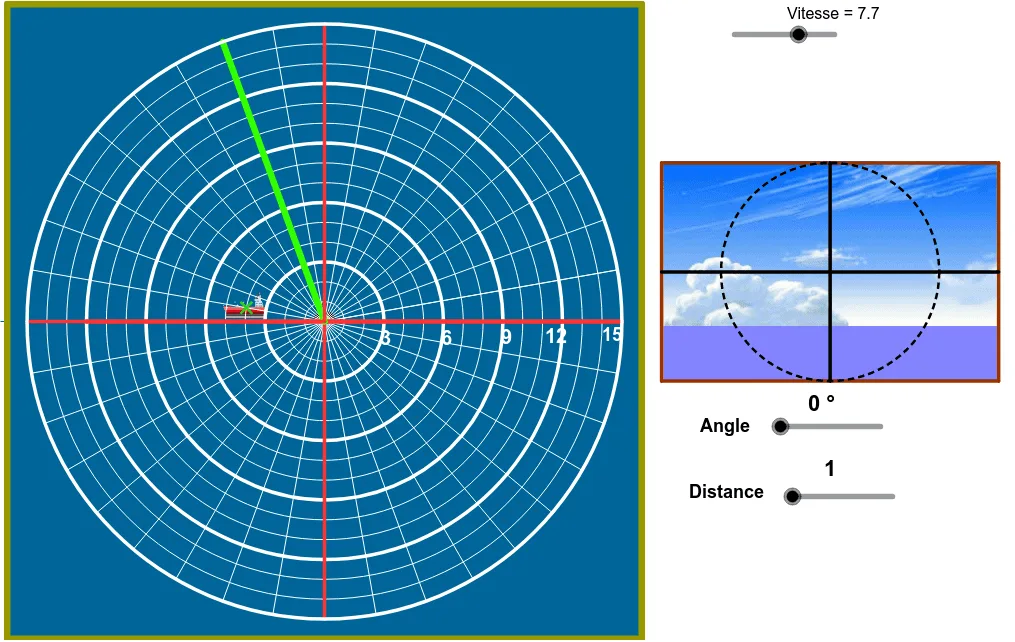
This GeoGebra worksheet demonstrates a boat game based on polar coordinates, where a boat's position and heading are defined by a radius (distance from the origin) and an angle. The core mathematical concepts include polar coordinates, unit circle, angle measurement, rotation, and random generation. Construction uses the commands Random (to set the initial boat position), Circle (to draw circular trajectories), Ray and OrthogonalLine (to create directional lines), Intersect (to find intersections), CircumcircleArc (to draw arcs), Midpoint (to locate midpoints), Sequence (to generate series of points), If (for conditional logic), Angle (to compute angles), Segment (to draw line segments), Polygon (to form polygons), Line (to draw straight lines), Rotate (to rotate objects), Mod (for modulo operations), and Point (to place key points). The example is suitable for high school mathematics teaching of coordinate geometry and trigonometry, as well as for learning GeoGebra construction techniques.
GeoGebra Commands & Parameters
Random(4.0, 15.0) → rrCircle(A, (1.5 * v - 1.0) * rr) → c'Ray(A, (0.0, 0.0)) → aOrthogonalLine(A, a) → bIntersect(c', b) → B, CIntersect(c', a) → D, TCircumcircleArc(B, D, C) → dMidpoint(C, D) → EMidpoint(B, D) → F_2Ray(A', E) → eRay(A', F_2) → fIntersect(d, e) → G,Intersect(d, f) → H,CircumcircleArc(G, D, H) → gCircle(I, 1.0) → hSequence(Text[If[s < 10.0, " ", ""] + (s), (21.6 + 2.0 * Mod[s - 1.0, 3.0], 7.75 - 2.0 * Div[s - 1.0, 3.0])], s, 1.0, 12.0) → liste3Circle(J, 1.0) → kSequence(Text[If[s ≟ 1.0, " ", If[s < 5.0, " ", ""]] + (30.0 * (s - 1.0)) + "º", (21.25 + 2.0 * Mod[s - 1.0, 3.0], -(6.25) - 2.0 * Div[s - 1.0, 3.0])], s, 1.0, 12.0) → liste4If(yB > -(5.0), 5.0*°, ((xB - 3.0 * yB) / 2.0 - 19.0 - 1.0) * 30.0°) → angIf(ang ≟ α ∧ dist ≟ rr, true, false) → razAngle((1.0, 0.0), (0.0, 0.0), A) → βSegment(O, N) → mCircle(A, (2.0 * v - 1.0) * rr - n) → pSequence(Circle[A, (1.5 * v - 1.0) * rr - i], i, 0.0, n, n / 10.0) → liste5Polygon(P, Q, R, S) → poly1, p_1, q, r_1, sAngle((1.0, 0.0), (0.0, 0.0), A) → γCircle((0.0, 0.0), If[2.0 * v * rr > 12.0, 0.0, 2.0 * v * rr]) → cMidpoint(K, L) → UMidpoint(U, L) → VMidpoint(U, V) → WMidpoint(V, L) → ZSegment(K, C_1) → lLine(A, l) → iSegment(A, U) → tIntersect(c, t) → A_1, B_1Segment(U, A_1) → a_1Circle(U, W) → c_1Circle(U, V) → d_1Circle(U, Z) → e_1Circle(U, L) → f_1Rotate(C_1, 6.0 * v, U) → L'Segment(U, L') → b_1Mod(v * 100.0, 2.0) → abSequence(Circle[(0.0, 0.0), t], t, 1.0, 15.0) → liste1Sequence(Segment[(0.0, 0.0), (15.0; 2.0 * 3.141592653589793 * t / 36.0)], t, 0.0, 37.0) → liste2Segment(O, D_1) → jCircle(O, C_1) → g_1Point(g_1) → E_1Segment(O, E_1) → h_1Circle(U, C_1) → k_1Circle(F_1, 8.0 - r / 2.5) → q_1Line(F_1, l) → i_1Intersect(q_1, i_1) → G_1, H_1Line(J_1, r_1) → j_1Point(j_1) → N_1Line(N_1, l) → l_1Line(J_1, l) → m_1Point(m_1) → O_1Point(l_1) → P_1Intersect(l_1, r_1) → M_1Polygon(M_1, N_1, J_1, F) → poly2, m_2, n_1, j_2, f_2Point(l_1) → Q_1Point(m_1) → R_1Polygon(P_1, Q_1, R_1, O_1) → poly3, p_2, q_2, r_2, o_1Point(j_1) → S_1Point(o_1) → T_1Polygon(S_1, T_1, O_1, J_1) → poly4, s_1, t_1, o_2, j_3Midpoint(s_1) → V_1Midpoint(o_2) → W_1Midpoint(S_1, J_1) → Z_1Midpoint(t_1) → A_2Segment(V_1, W_1) → a_2Segment(Z_1, A_2) → b_2Intersect(b_2, a_2) → B_2Circle(B_2, V_1) → c_2
AI Drawing Prompt Reference
Create a polar coordinate-based boat game illustration with a central circle for trajectories, a randomly generated initial boat position, rays and perpendicular lines defining direction, intersection points with the circle, connected by arcs, text labels showing angles and distances, boat paths formed by multiple circles, a background with a unit circle and concentric circles, depicting a dynamic polar coordinate game scene.
The prompt above was compiled from the original drawing commands and is for reference only.