
Plane Vectors Geometry Example
Loading the math board and drawing, please wait…
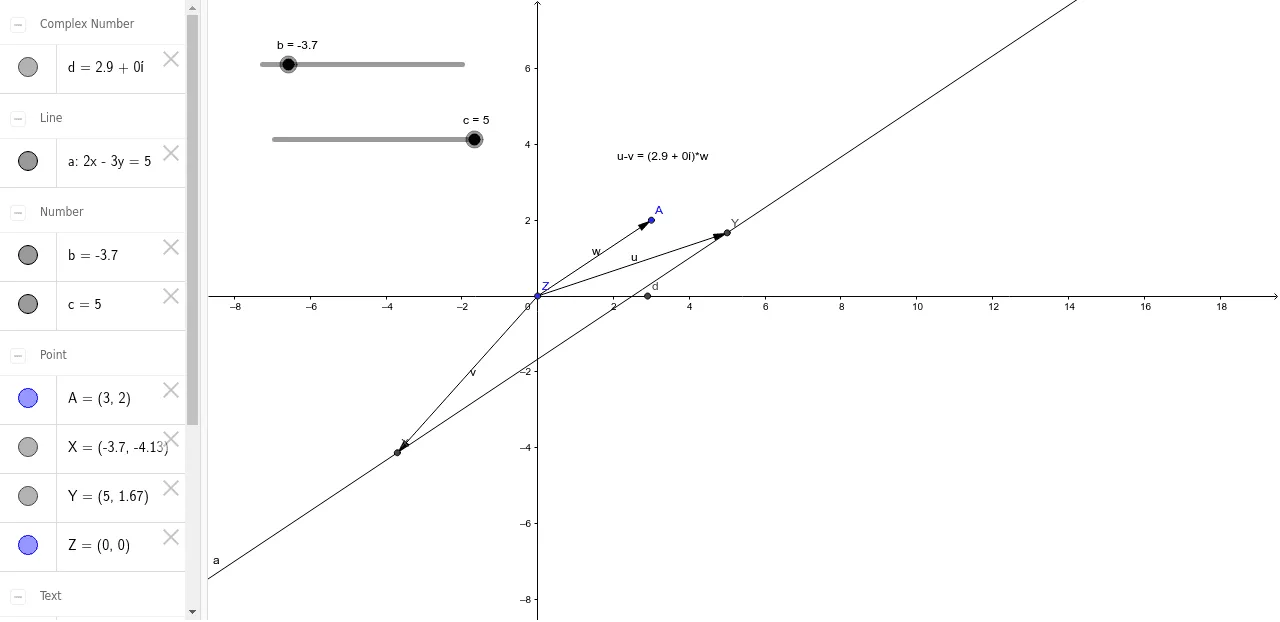
This GeoGebra example demonstrates how to construct plane geometry figures using vector commands, including vector addition, subtraction, and scalar multiplication to form triangles and polygons. The core mathematical concepts cover basic vector operations, coordinate representation, relationships between sine and tangent functions, and the geometric meaning of derivatives. Construction details: Uses the Vector command to create vector objects a, b, c, u, v, w, combined with coordinate points X, Y, Z, A for vector construction, with optional text labels. Suitable for high school vector mathematics teaching, introductory coordinate geometry, and preparation for advanced vector analysis in calculus courses. Students can interactively understand the intrinsic connection between vectors and geometric figures.
GeoGebra Commands & Parameters
Vector(Z, Y) → uVector(Z, X) → vVector(Z, A) → w
AI Drawing Prompt Reference
Please draw a plane vector geometry example in a coordinate system. Start with one common origin point, then create three arrowed vectors from that same origin to three different endpoint locations. The vectors should clearly show direction, length, and coordinate relationships, forming a simple diagram for explaining basic plane vector operations and coordinate representation. Keep the style clean and geometric, with visible arrowheads and no extra curves, polygons, or unrelated objects.
The prompt above was compiled from the original drawing commands and is for reference only.