
Pipe Elbow Cross Section
Loading the math board and drawing, please wait…
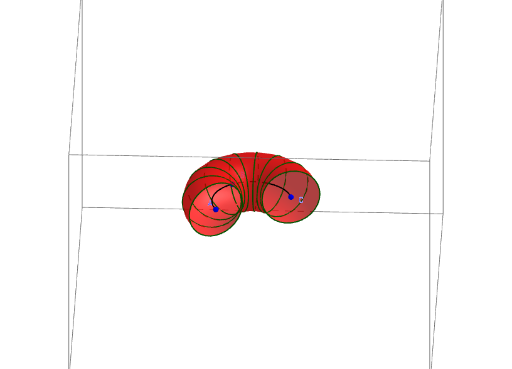
This example demonstrates how to extrude a circle along an arc to construct the cross section of a pipe elbow. Key mathematical concepts include circles, arcs, and solid geometry. GeoGebra commands used include Center, CircumcircleArc, If, and Cylinder. Suitable for high school geometry and solid geometry courses.
GeoGebra Commands & Parameters
Center(Circle[A, B, C]) → DCircumcircleArc(A, B, C) → arIf(β < γ, α, α + γ) → begIf(β < γ, α + γ, α + (2 * π)) → endIf(¬ali, Surface[((Distance[A, D] + (r * cos(v))) * cos(u)) + x(D), ((Distance[A, D] + (r * cos(v))) * sin(u)) + y(D), (r * sin(v)), u, beg, end, v, 0, 6.28319]) → dCylinder(A, C, r) → a, c, e, bIf(¬ali, Sequence[Circle[Point[ar, i], r, Tangent[Point[ar, i], ar]], i, 0, 1, 1 / n], Sequence[Circle[Point[Segment[A, C], i], r, Segment[A, C]], i, 0, 1, 1 / n]) → liste1
AI Drawing Prompt Reference
Draw the cross-section of a pipe elbow. Start by drawing a circle, then extrude it along an arc to form the elbow's cross-section. Key objects include a circle, an arc, and a cylinder. First, find the center of the circle, then draw the circumcircle arc, and determine the start and end angles of the arc based on the given conditions. Finally, use these angles and the circle's radius to generate the surface of the pipe elbow cross-section through rotation and translation.
The prompt above was compiled from the original drawing commands and is for reference only.