
Piecewise Functions by Luis Miguel López Herranz
Loading the math board and drawing, please wait…
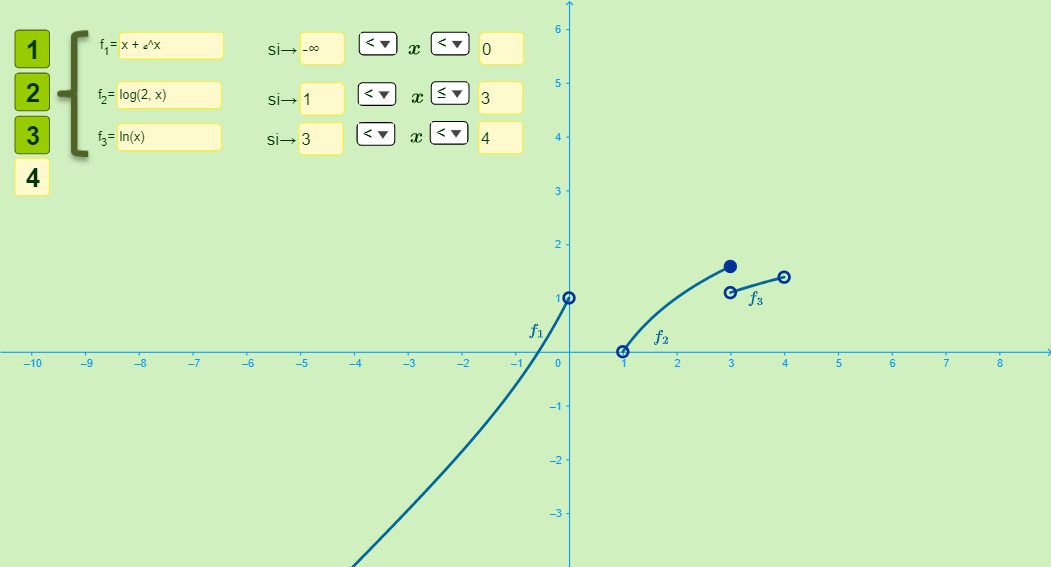
This example demonstrates the construction of piecewise functions. A piecewise function is defined by different expressions over different intervals. Using GeoGebra commands such as SelectedIndex, Name, and Textfield, users can easily create and manipulate piecewise functions. The commands mentioned in the construction summary help in dynamically adjusting the definition of the piecewise function. Suitable for high school mathematics education and learning.
GeoGebra Commands & Parameters
SelectedIndex(lista1) → aName(lista1) → B1_1Name(lista1) → B2_1SelectedIndex(lista2) → bSelectedIndex(lista3) → cSelectedIndex(lista4) → dSelectedIndex(lista5) → eSelectedIndex(lista6) → fSelectedIndex(lista7) → gSelectedIndex(lista8) → hName(lista1) → B1_2Textfield(i) → CasillaDeEntrada1Textfield(j) → CasillaDeEntrada2Textfield(k) → CasillaDeEntrada3Textfield(l) → CasillaDeEntrada4Textfield(m) → CasillaDeEntrada5Textfield(o) → CasillaDeEntrada6Textfield(u) → CasillaDeEntrada7Textfield(v) → CasillaDeEntrada8Textfield(p) → CasillaDeEntrada9Textfield(q) → CasillaDeEntrada10Textfield(r) → CasillaDeEntrada11Textfield(s) → CasillaDeEntrada12