
Perpendicular Lines Slope Exploration
Loading the math board and drawing, please wait…
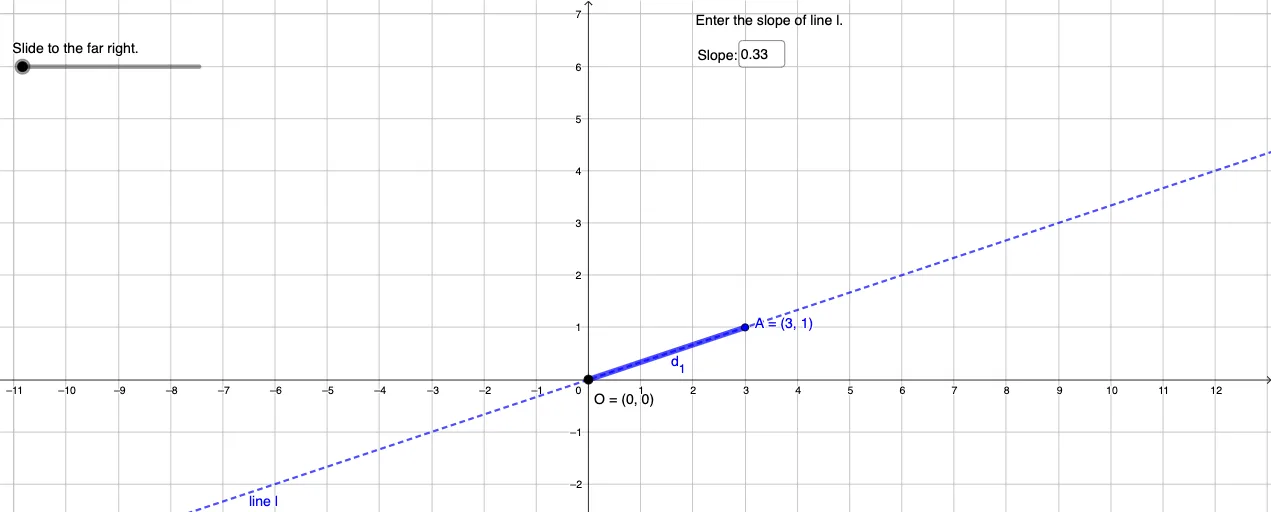
This interactive GeoGebra example demonstrates the relationship between slopes when two lines are perpendicular. Users can dynamically adjust line parameters using sliders and input boxes to observe how the geometric and algebraic conditions for perpendicularity work together. Key mathematical concepts covered: slope formula for linear functions, the negative reciprocal relationship (product = -1) between perpendicular line slopes, and coordinate plane line representation. Construction highlights: Line command for drawing lines, InputBox for parameter input, Angle command to verify right angles, If command for perpendicularity conditions, Rotate command for line rotation, and Segment command for auxiliary constructions. Suitable for middle to high school mathematics, serving as both a teaching tool for linear functions and coordinate geometry, and as an exploratory learning resource for understanding the intrinsic connection between perpendicularity and slopes.
GeoGebra Commands & Parameters
Textfield(a) → InputBox1Denominator(a) → bRotate(A, d°, O) → A'Line(O, A') → fIf(d > 0, f) → mIf(d > 0, A') → BSegment(A, B) → d_3Segment(O, A) → d_1Segment(O, B) → d_2Polygon(O, C, A) → t1, a_1, o, cPolygon(O, D, B) → t2, b_1, o_1, d_4Angle(O, D, B) → αPolygon(B, F, A) → t3, a_2, b_2, f_1
AI Drawing Prompt Reference
Draw two perpendicular lines and observe their slope relationship by adjusting parameters. First, draw point O and point A, then rotate point A to get point A', and draw line f through O and A'. Depending on the value of d, show or hide line f and point B. Draw line segments OA and OB, and triangles OCA and ODB. Finally, measure the angle OBD.
The prompt above was compiled from the original drawing commands and is for reference only.