
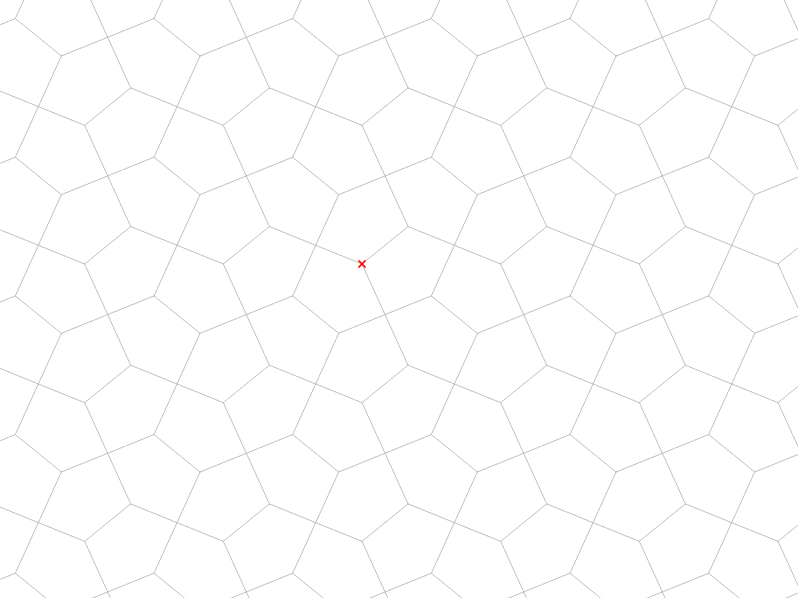
Pentagon Tiling Case 2
Loading the math board and drawing, please wait…
In collections
Symmetry, Transformation and Tessellation
This example demonstrates the geometric phenomenon of pentagon tiling. It involves core mathematical concepts such as symmetry, cosine, set theory, tangent lines, polynomial functions, and centroid. The construction utilizes GeoGebra commands and objects like Point, Midpoint, Segment, Vector, Mirror, Translate, Sequence, and LineBisector. Suitable for high school mathematics teaching and geometric construction learning.
GeoGebra Commands & Parameters
Point(xAxis) → BMidpoint(A, B) → EMidpoint(C, B) → IMidpoint(C, A) → HSegment(K, N) → hSegment(K, M) → gSegment(J, K) → eVector(C, I) → tVector(B, I) → wMidpoint(D, C) → GMidpoint(B, D) → FSegment(H, F) → bMirror(cell1, b) → cell3Translate(cell3, t) → cell3aSegment(E, G) → cMirror(cell1, c) → cell2Translate(cell2, w) → cell2aMirror(cell2, b) → cell4Vector(A, B) → uVector(A, C) → vVector(C, D) → w_1Vector(B, D) → aSequence(Translate[Sequence[Translate[tile, Vector[(n * u)]], n, -3, 3], Vector[(m * v)]], m, -3, 3) → tilingSegment(H, I) → rSegment(E, I) → sLineBisector(C, G) → kLineBisector(G, D) → lLineBisector(C, H) → mLineBisector(H, A) → n
AI Drawing Prompt Reference
Draw a plane tiling composed of pentagons to demonstrate symmetry. Start by establishing a base point and find multiple midpoints to connect and form pentagons. Use vectors and mirror operations to create copies of the pentagons, then reflect and translate them symmetrically to arrange them tightly. Finally, add some auxiliary line segments and angle bisectors to highlight key features of the geometric construction.
The prompt above was compiled from the original drawing commands and is for reference only.