
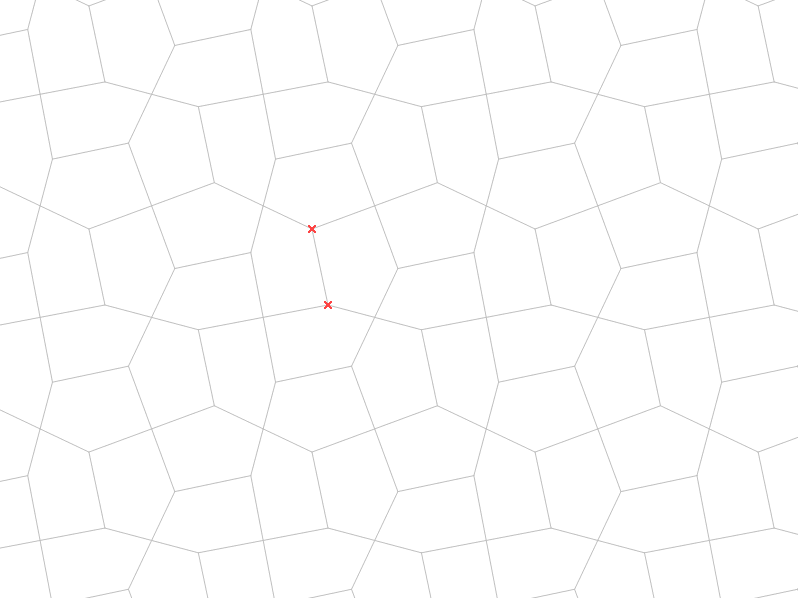
Pentagon Tiling Case 1
Loading the math board and drawing, please wait…
In collections
Symmetry, Transformation and Tessellation
This example demonstrates the construction of pentagon tiling. Key mathematical concepts include geometric transformations and polygons. Using commands such as midpoint, segment, vector, rotation, and sequence, a pentagon tiling pattern can be constructed. Suitable for middle school and above students to learn geometric transformations and pentagon tiling.
GeoGebra Commands & Parameters
Midpoint(C, B) → ISegment(K, N) → hMidpoint(C, A) → HSegment(J, K) → eMidpoint(A, B) → ESegment(K, O) → mSegment(O, L) → fSegment(O, M) → gMidpoint(B, D) → FMidpoint(D, C) → GVector(A, B) → uVector(A, C) → vVector(C, D) → wVector(B, D) → aSegment(H, F) → bSegment(E, G) → cRotate(cell1, 90*°, I) → cell2Rotate(cell1, 180*°, I) → cell3Rotate(cell1, 270*°, I) → cell4Sequence(Translate[Sequence[Translate[tile, Vector[(n * u)]], n, -3, 3], Vector[(m * v)]], m, -3, 3) → tilingSegment(H, I) → kSegment(E, I) → l
AI Drawing Prompt Reference
Draw a tessellation pattern composed of regular pentagons, demonstrating geometric transformations. Start by constructing a regular pentagon, then find the midpoints of its sides and vertices, and connect these points to form guide segments. Next, use vectors to represent the directions of the pentagon's sides and rotate the pentagon around its center to create multiple rotated copies. Finally, translate and combine these copies to form a complete tessellation pattern, highlighting the beauty of geometric transformations and the arrangement of regular polygons.
The prompt above was compiled from the original drawing commands and is for reference only.