
Parametric Generation of a Parabola
Loading the math board and drawing, please wait…
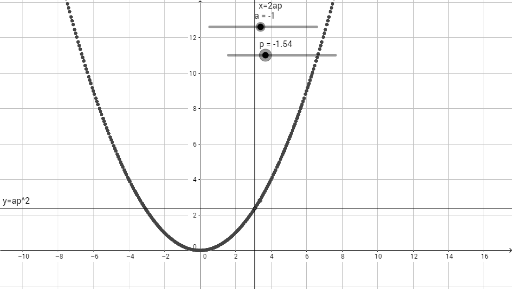
This example demonstrates the dynamic generation of a parabola using parametric equations. Key math concepts include parametric equations, unit circle, and coordinate geometry. Construction highlights the use of GeoGebra commands/objects: a (parameter), p (point), ap (vector), f (function), g (graph), P (point). Suitable for high school and above students to understand the application of parametric equations in plane curve generation.
GeoGebra Commands & Parameters
Numeric a(-1)Numeric p(-1.54)(a * p)x = (2 * ap)y = ap^(2)((2 * ap), ap^(2))
AI Drawing Prompt Reference
Draw a parabola generated by parametric equations. First, set parameter a to -1, then set point p to -1.54. Next, calculate the product of parameter a and point p, use this product as the x-coordinate, and its square as the y-coordinate to get a point on the parabola. Finally, connect these points to form the parabola.
The prompt above was compiled from the original drawing commands and is for reference only.