
Parametric Curves and Circle Construction Demo
Loading the math board and drawing, please wait…
In collections
Geometry of Angles (Student Created)
This example demonstrates how to plot parametric curves and illustrates the relationship between pi, triangles, and circles. Key math concepts include parametric curves, circumcircle, Pythagorean theorem, step functions, and geometric transformations. Construction highlights the use of GeoGebra commands like Segment, Point, Rotate, and Angle. Suitable for high school and above students to understand the integration of parametric equations and geometric constructions.
GeoGebra Commands & Parameters
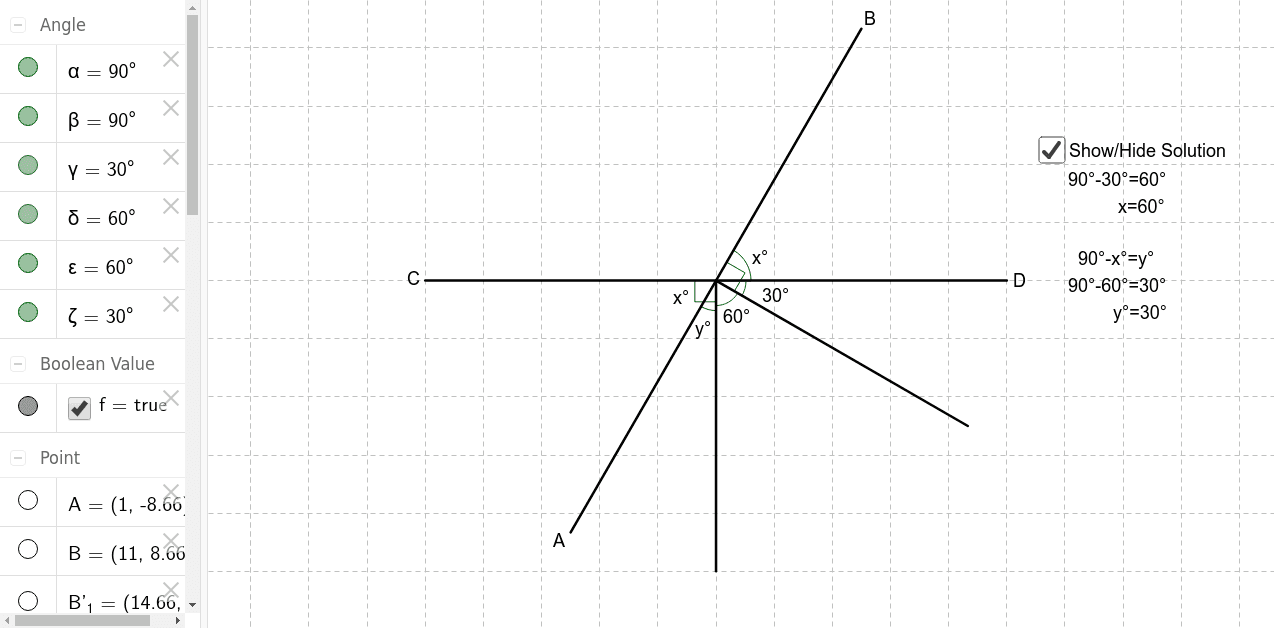
Segment(C, D) → aPoint(a) → C_1Rotate(D, 330*°, C_1) → B'_1Segment(C_1, B'_1) → bRotate(B'_1, 300*°, C_1) → D_1Segment(C_1, D_1) → cRotate(D_1, 330*°, C_1) → ASegment(C_1, A) → dRotate(D, 60*°, C_1) → BSegment(C_1, B) → eAngle(B'_1, C_1, B) → αAngle(C, C_1, D_1) → βAngle(B'_1, C_1, D) → γAngle(D_1, C_1, B'_1) → δAngle(D, C_1, B) → εAngle(A, C_1, D_1) → ζ
AI Drawing Prompt Reference
Draw a parametric curve and circle construction demonstration, illustrating the relationship between pi, triangles, and circles. Start by drawing a line segment, then create a point on one end and rotate the segment multiple times around that point, each time with a gradually decreasing angle. Mark multiple angles to show the changes in angles during rotation, forming several intersections and segments. The final image should present a complex geometric figure composed of multiple triangles and circles, showcasing the integration of parametric equations and geometric constructions.
The prompt above was compiled from the original drawing commands and is for reference only.