
Parallelogram Construction and Properties by mtorres1
Loading the math board and drawing, please wait…
In collections
Is it a Parallelogram?
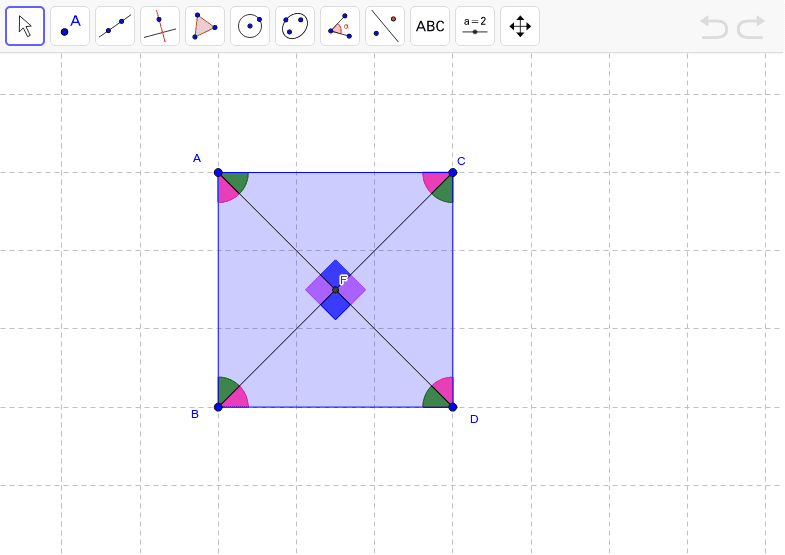
This example demonstrates the construction and properties of parallelograms using GeoGebra, helping students understand the definition, properties, and construction methods of parallelograms. Key mathematical concepts include the definition of a parallelogram, side length relationships, diagonal properties, and similarity transformations. Construction involves using commands like Segment, Line, Intersect, Polygon, Slope, and Angle to create parallelograms and verify geometric relationships. Suitable for middle school geometry learning to reinforce parallelogram knowledge and enhance spatial geometric thinking.
GeoGebra Commands & Parameters
Segment(A, B) → aLine(C, a) → bSegment(A, C) → cLine(B, c) → dIntersect(b, d) → DPolygon(A, B, D, C) → poly1, a_1, b_1, d_1, c_1Slope(c) → m_2Slope(b) → m_1Line(B, A) → eSlope(e) → mLine(A, C) → fSlope(d) → m_3Angle(B, A, C) → αAngle(C, D, B) → βAngle(A, C, D) → γAngle(D, B, A) → δSegment(A, D) → gSegment(B, C) → hIntersect(g, h) → ESegment(B, E) → iSegment(E, C) → jSegment(A, E) → kSegment(E, D) → lSegment(A, D) → nSegment(B, C) → pIntersect(n, p) → FAngle(A, C, F) → εAngle(C, D, F) → ζAngle(D, B, F) → ηAngle(B, A, F) → θAngle(F, A, C) → ιAngle(F, C, D) → κAngle(F, D, B) → λAngle(F, B, A) → μAngle(C, F, A) → νAngle(B, F, D) → ξAngle(A, F, B) → οAngle(D, F, C) → ρ
AI Drawing Prompt Reference
Please draw a parallelogram. First, draw two line segments A and C. Then, draw the parallelogram A, B, D, C. Next, draw the diagonals AC and BD, and find their intersection point D. Then, draw the intersection points E and F. Finally, calculate the slopes and angles of the parallelogram. Ensure the figure is clear and shows all key elements.
The prompt above was compiled from the original drawing commands and is for reference only.