
Parallel Lines, Transversals, and Angles
Loading the math board and drawing, please wait…
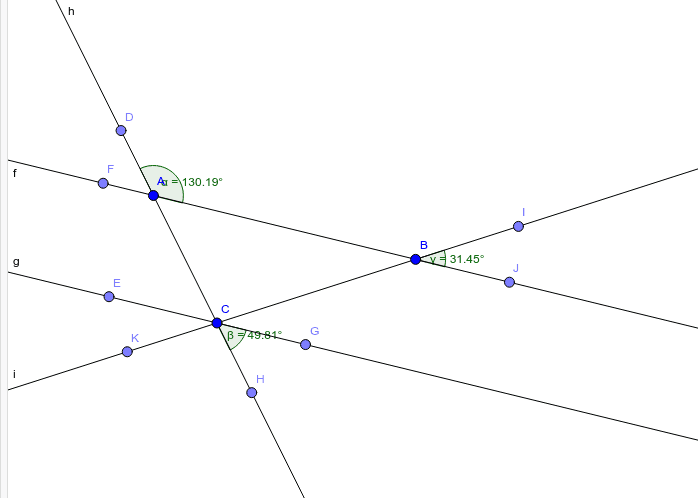
This GeoGebra example dynamically demonstrates the properties of angles formed when two parallel lines are intersected by two transversals. It visually explores relationships such as corresponding angles, alternate interior angles, and consecutive interior angles, reinforcing the fundamental theorems of parallel lines. The construction uses the Line command to create two parallel lines (f and g), Point commands to place points on the lines, and two transversals (h and i) defined by points C, D, E, etc. Angles α, β, γ are marked at intersections using the Angle command. Users can drag points or lines to observe how angle measures change while the parallel relationship is preserved. This is ideal for middle school geometry lessons, high school review, or as an interactive teacher demonstration to verify angle theorems.
GeoGebra Commands & Parameters
Line(A, B) → fLine(C, f) → gLine(A, C) → hPoint(h) → DPoint(g) → EPoint(f) → FPoint(g) → GAngle(B, A, D) → αPoint(h) → HAngle(H, C, G) → βLine(B, C) → iPoint(i) → IPoint(f) → JAngle(J, B, I) → γPoint(i) → K