
Parabola Construction from Focus and Directrix
Loading the math board and drawing, please wait…
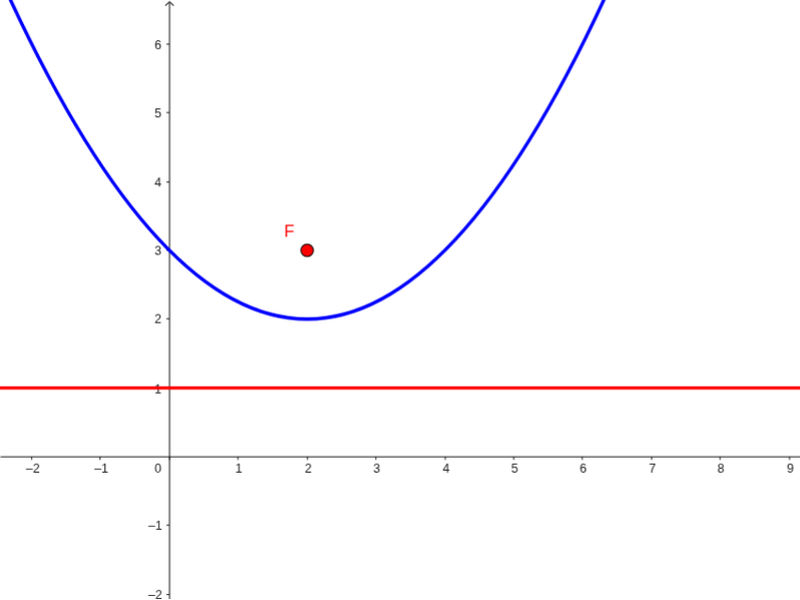
This GeoGebra applet provides a dynamic visualization of how a parabola is geometrically constructed from its focus and directrix. It demonstrates the locus of points in a plane that are equidistant from a fixed point (the focus F) and a fixed line (the directrix a). Key mathematical concepts covered include the geometric definition of conic sections, specifically the parabola, the distance formula from a point to a line, and the relationship between geometric parameters and algebraic quadratic equations. The construction utilizes the core GeoGebra command Parabola along with key objects like the focus F, and parameters a and c to dynamically generate the curve. Users can interactively manipulate these elements to observe how changes in the focus distance or the directrix slope affect the curvature and vertex of the parabola. This example is highly suitable for high school coordinate geometry classes, university-level introductory geometry courses, and anyone looking to build an intuitive understanding of conic sections and quadratic functions.
GeoGebra Commands & Parameters
Parabola(F, a) → c
AI Drawing Prompt Reference
Create a dynamic geometric diagram illustrating the construction of a parabola from a focus and a directrix. The figure includes a fixed point as the focus, a fixed line as the directrix, and a parabola determined by both. Every point on the parabola is equidistant from the focus and the directrix. Adjusting the focus position or the directrix slope changes the parabola's opening direction, vertex location, and curvature. Clearly label the focus, the directrix, and the parabola, and visually emphasize the equidistance property.
The prompt above was compiled from the original drawing commands and is for reference only.