
Parabola Construction: Focus, Directrix, and Locus
Loading the math board and drawing, please wait…
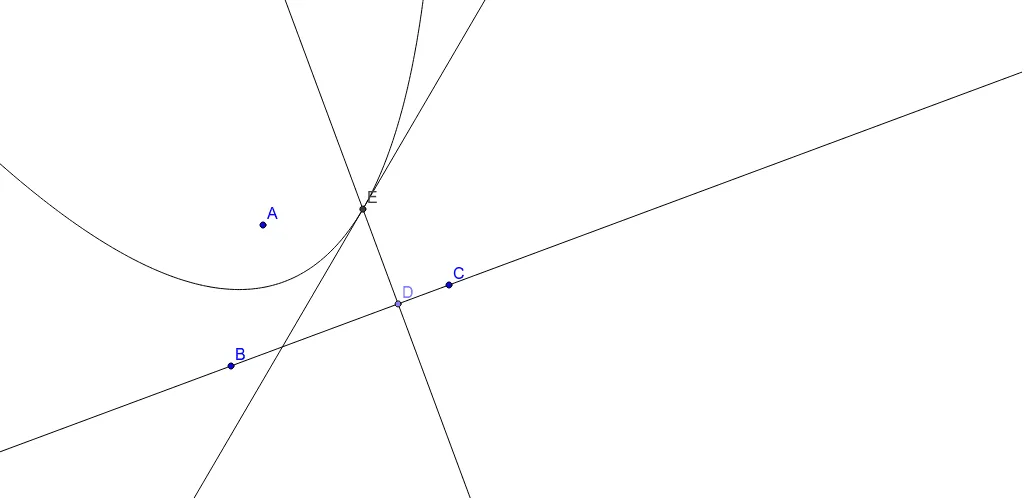
① This example demonstrates how to construct a parabola geometrically and use the locus tool to dynamically display the set of all points on the parabola. ② The core mathematical concept is the definition of a parabola as the locus of points equidistant from a fixed point (focus) and a fixed line (directrix), involving conic sections, special points, and the relationship with trigonometric functions and real numbers. ③ Construction highlights: from the construction summary, the GeoGebra commands used include Line, Point, OrthogonalLine, LineBisector, Intersect, and Locus; objects include A, B, C, a, D, b, c, E, and the locus loc1. The process involves constructing the focus and directrix, then drawing perpendicular lines and perpendicular bisectors to find intersection points, finally generating the locus. ④ Suitable for high school or early college analytic geometry and conic sections teaching, also useful for dynamic demonstrations of the parabola definition, helping students intuitively understand the relationship between focus, directrix, and locus, and serving as a GeoGebra construction exercise.
GeoGebra Commands & Parameters
Line(B, C) → aPoint(a) → DOrthogonalLine(D, a) → bLineBisector(A, D) → cIntersect(b, c) → ELocus(E, D) → loc1
AI Drawing Prompt Reference
Draw a straight line to serve as the directrix and choose a movable point on it; through that point construct a perpendicular line. Then fix a point as the focus, join the focus to the movable point and draw the perpendicular bisector of that segment. The intersection of the two perpendicular lines moves as the point slides along the directrix, and its locus forms a parabola, illustrating the geometric definition of a parabola as the set of points equidistant from the focus and the directrix.
The prompt above was compiled from the original drawing commands and is for reference only.