
Parabola and Tangent Line Intersection Demo
Loading the math board and drawing, please wait…
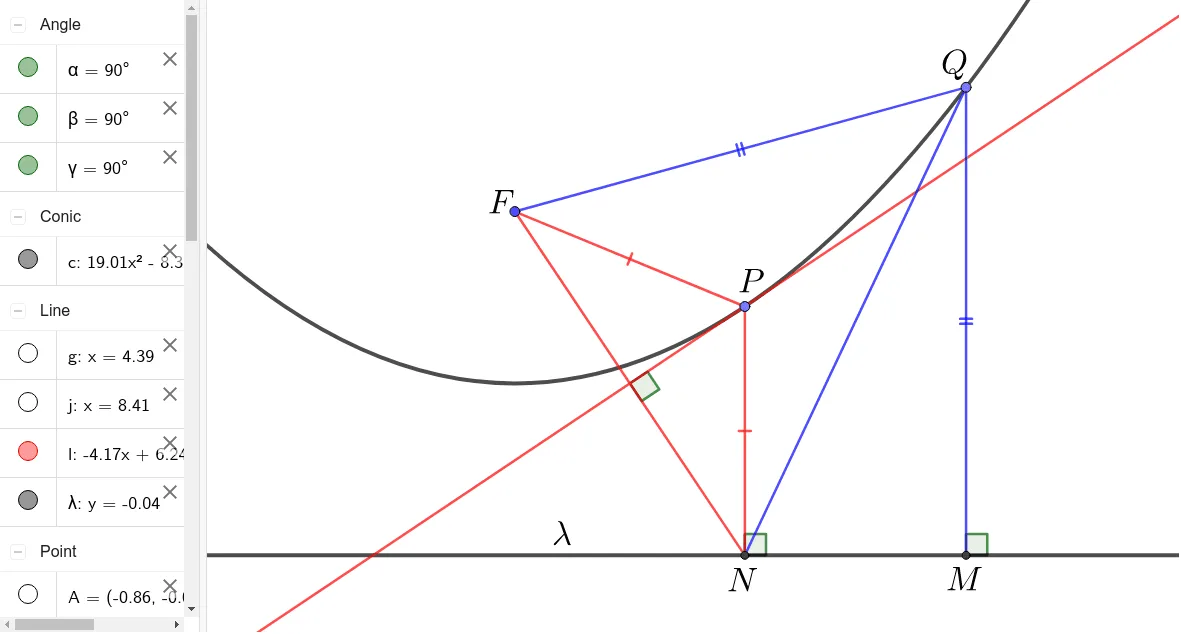
This example demonstrates the intersection of a parabola and its tangent line, along with geometric properties like the normal line and reflection. Key math concepts include coordinate geometry, tangent line equations, reflection theorems, and cosine rules. Construction involves commands such as Line, Parabola, Point, OrthogonalLine, Intersect, Segment, Angle, and LineBisector. Suitable for high school and above students studying parabolas and tangent properties.
GeoGebra Commands & Parameters
Line(A, B) → λParabola(F, λ) → cPoint(c) → POrthogonalLine(P, λ) → gIntersect(g, λ) → NSegment(P, N) → hSegment(P, F) → iSegment(F, N) → FNPoint(c) → QLine(Q, Vector[OrthogonalVector[λ]]) → jIntersect(j, λ) → MAngle(M + Vector[N, M], M, Q) → αAngle(M, N, P) → βSegment(Q, N) → fSegment(Q, F) → kLineBisector(F, N) → lAngle(N, Intersect[FN, l], P) → γSegment(Q, M) → m
AI Drawing Prompt Reference
Draw a parabola with a given focus and directrix. Pick a point on the parabola and drop a perpendicular to the directrix, marking the foot. Connect this point to the focus and the focus to the foot. Choose another point on the parabola, draw a line through it parallel to the directrix, intersecting the directrix at a new point. Construct two angles showing reflection and normal properties, and connect relevant points with segments. Finally, draw the perpendicular bisector of the segment between the focus and the first foot, and label the related angle.
The prompt above was compiled from the original drawing commands and is for reference only.