
Parabola and Conic Section Property
Loading the math board and drawing, please wait…
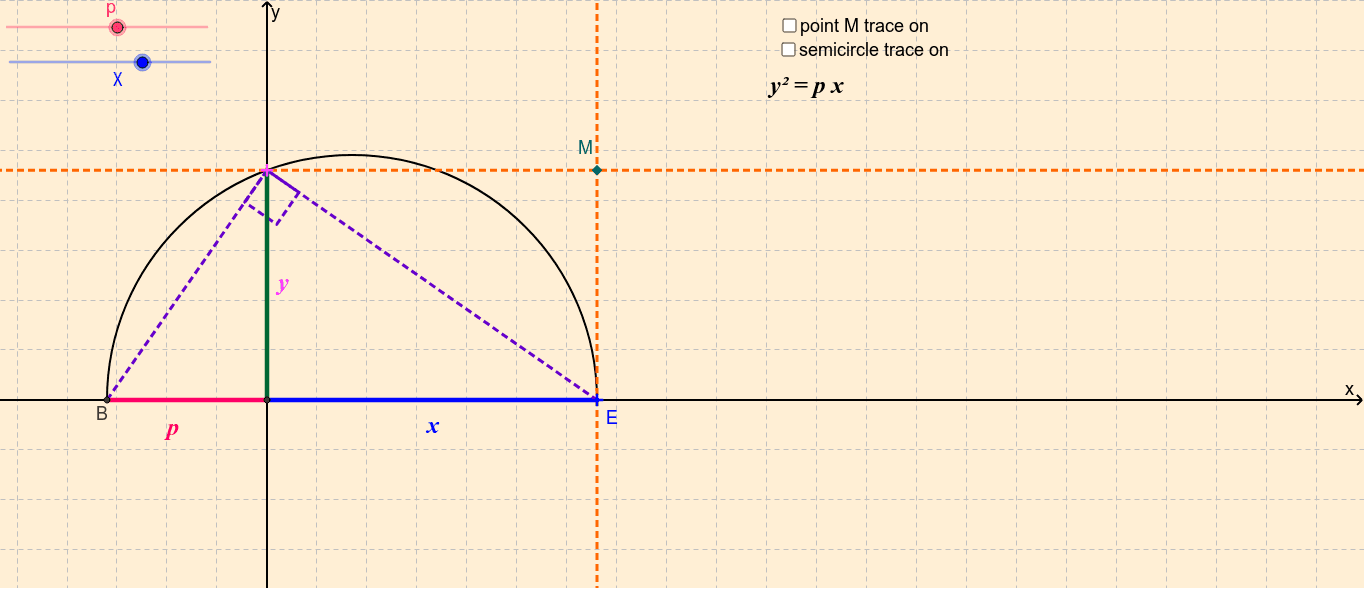
This example demonstrates the intriguing property where as point M traces a parabola, segment BE generates a pencil of conic sections. Key math concepts include parabola, circle, conic sections, and geometric constructions. It is constructed using commands like Intersect, Circle, Segment, Semicircle, Angle, Midpoint, and OrthogonalLine. Suitable for high school and above students to explore geometric properties of parabolas and the formation of conic sections.
GeoGebra Commands & Parameters
Intersect(xAxis, yAxis) → ACircle(A, p) → cIntersect(c, xAxis) → B, CSegment(A, B) → aSemicircle(B, E) → dSegment(A, E) → bIntersect(d, yAxis) → G,Segment(B, G) → eSegment(G, E) → fSegment(G, A) → gAngle(B, G, E) → αMidpoint(G, A) → HOrthogonalLine(G, yAxis) → hOrthogonalLine(E, xAxis) → iIntersect(h, i) → MSemicircle(B, E) → k
AI Drawing Prompt Reference
Draw a parabola and show that as point M traces the parabola, segment BE generates a pencil of conic sections. Start by plotting the intersection of the coordinate axes, then draw a circle centered at this point. Mark the intersection points and draw segments. Next, draw a semicircle with center B, find point G on the y-axis, and connect AG, BG, GE, GF, and GA. Calculate the angle between BG and GE, find the midpoint H between G and A, and draw lines perpendicular to the y-axis through G and to the x-axis through E; their intersection is M. Finally, draw another semicircle centered at B.
The prompt above was compiled from the original drawing commands and is for reference only.