
Orthocenter Construction and Properties of a Triangle
Loading the math board and drawing, please wait…
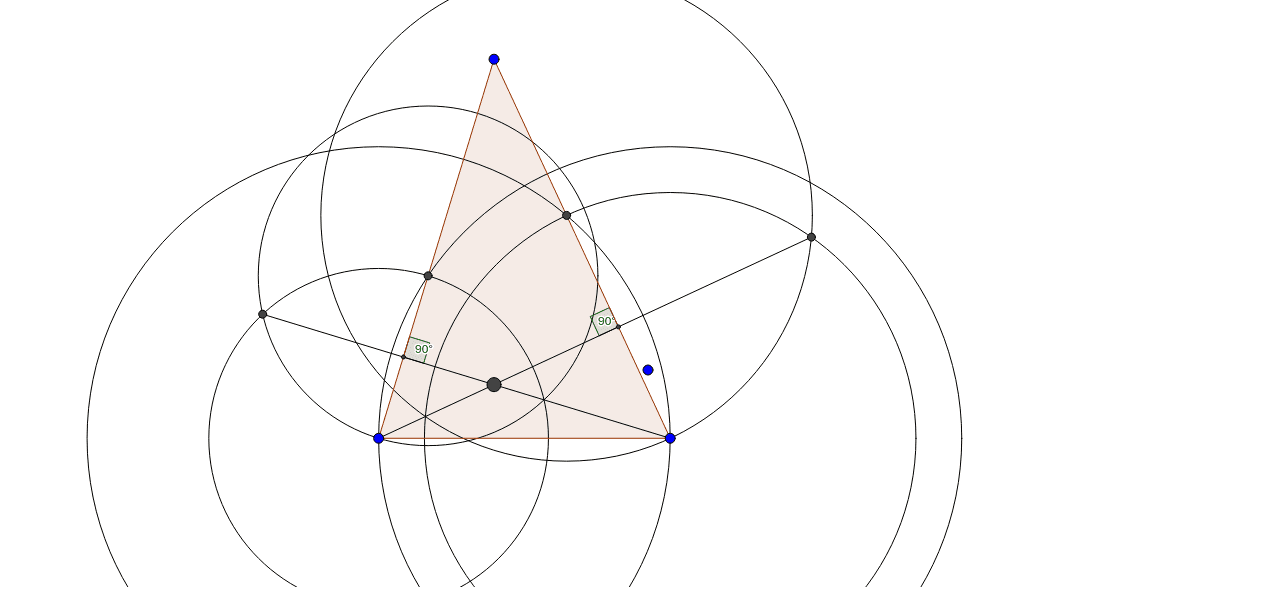
① This GeoGebra example demonstrates the construction of the orthocenter of a triangle, which is the intersection point of the three altitudes, and visually shows how its position changes for acute, right, and obtuse triangles. ② The core mathematical concept is the orthocenter and its geometric properties, involving altitudes, perpendicularity, intersection points, and the family of triangle centers (centroid, circumcenter, incenter, orthocenter). ③ Construction details: from the summary, the Polygon command creates triangle poly1, Circle constructs auxiliary circles, Intersect finds intersection points, Segment draws altitudes (e.g., d, e, f), Angle marks right angles, and multiple points (A, B, C, D, E, F, G, H, I, J, K) and angles α, β are defined; the orthocenter is obtained as the intersection of the altitudes. ④ Suitable for upper middle school or high school students, this example is useful for teaching the definition and properties of the orthocenter, exploring its location in different triangle types, and serving as a starting point for investigating relationships with other triangle centers.
GeoGebra Commands & Parameters
Polygon(A, B, C) → poly1, c, a, bCircle(B, Segment[B, C]) → dCircle(C, Segment[C, B]) → eIntersect(e, c, 1) → DIntersect(d, b, 2) → ECircle(B, Segment[D, B]) → fCircle(D, Segment[B, D]) → gIntersect(f, g, 1) → FSegment(F, C) → hCircle(E, Segment[C, E]) → kCircle(C, Segment[E, C]) → pIntersect(k, p, 1) → GSegment(B, G) → iIntersect(h, i) → HIntersect(c, h) → JIntersect(b, i) → KAngle(H, J, D) → αAngle(E, K, H) → β