
Orthocenter and Altitudes of a Triangle
Loading the math board and drawing, please wait…
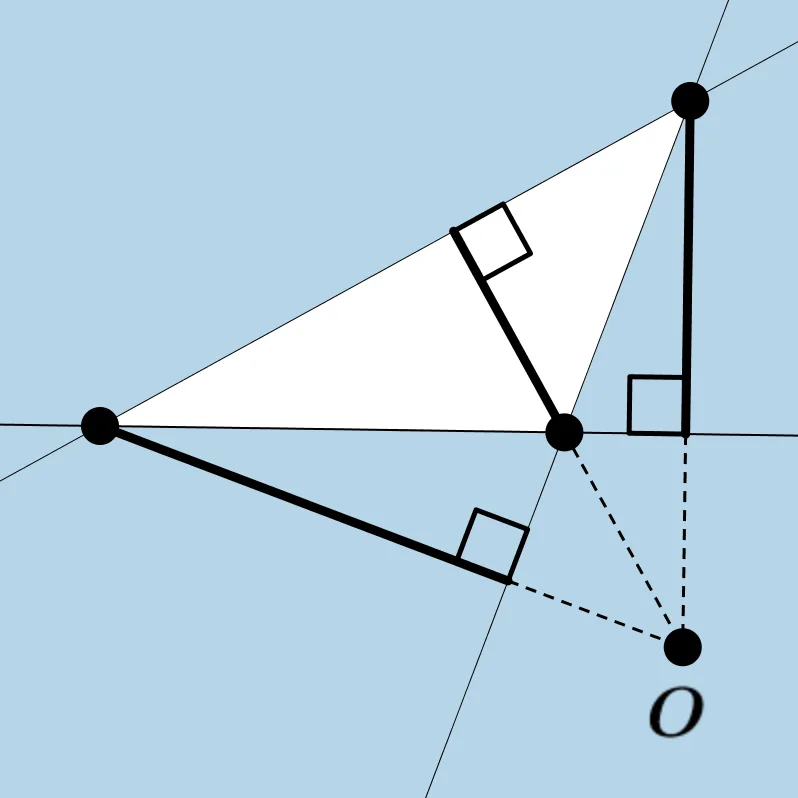
This applet demonstrates the orthocenter of a triangle, which is the intersection of the three altitudes. Students can discover properties of the orthocenter by manipulating the triangle. Key concepts include altitudes, orthocenter, and angles. GeoGebra commands used include Segment, OrthogonalLine, Intersect, Angle, Line, and Polygon. Suitable for middle school and above students to explore geometric constructions and triangle properties.
GeoGebra Commands & Parameters
Segment(A, B) → aSegment(B, C) → bSegment(C, A) → cOrthogonalLine(C, a) → dOrthogonalLine(A, b) → eOrthogonalLine(B, c) → fIntersect(d, e) → OIntersect(d, a) → EIntersect(f, c) → FIntersect(e, b) → GSegment(C, E) → gSegment(B, F) → hSegment(A, G) → iAngle(C, E, A) → αAngle(B, F, C) → βAngle(A, G, B) → γLine(A, B) → jIntersect(d, j) → DSegment(C, D) → kAngle(C, D, B) → δLine(B, C) → lPolygon(A, B, C) → poly1, c_1, a_1, b_1Intersect(e, l) → HSegment(A, H) → mAngle(A, H, C) → εLine(C, A) → nIntersect(f, n) → ISegment(B, I) → pAngle(B, I, A) → ζ
AI Drawing Prompt Reference
Draw a triangle and show its three altitudes, which are perpendicular segments from each vertex to the opposite side. Mark the intersection point of these altitudes, the orthocenter of the triangle. Then, draw perpendicular lines from the orthocenter to each side, marking the feet of these perpendiculars. Finally, calculate and display the measures of the triangle's three interior angles, as well as the angles formed by the orthocenter with the vertices and feet of the altitudes.
The prompt above was compiled from the original drawing commands and is for reference only.