
Origin of the Sine Function: A Unit Circle Demonstration
Loading the math board and drawing, please wait…
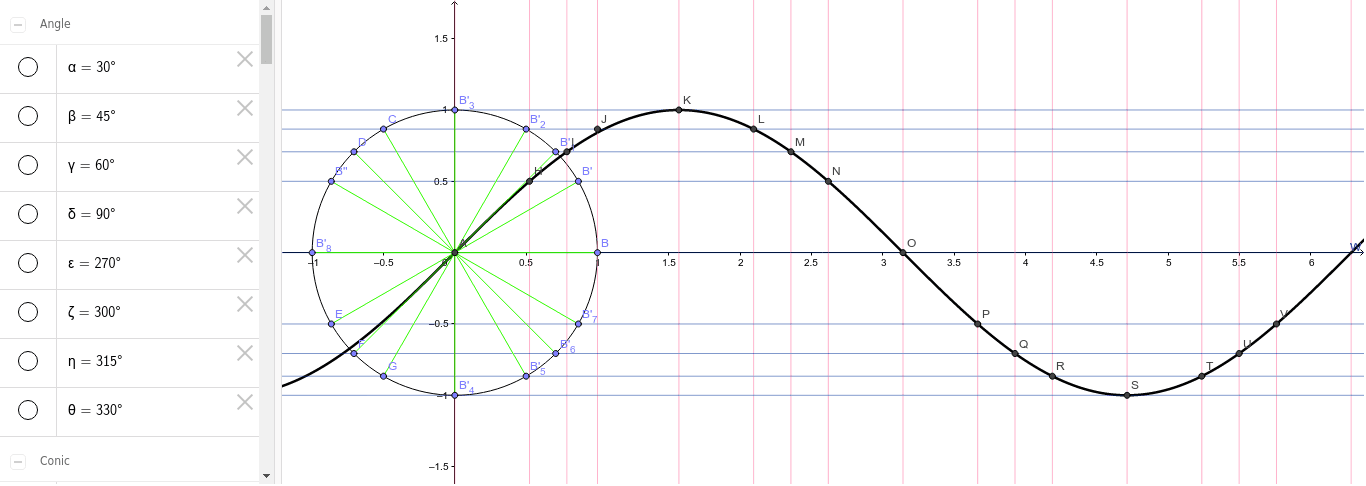
This GeoGebra example dynamically illustrates the origin of the sine function by tracing a point moving around the unit circle)Skip. It demonstrates how the sine value corresponds to the y-coordinate of a point on the circle as the angle rotates, and how this relationship generates the familiar sine wave. Core mathematical concepts include the unit circle, trigonometric functions (sine), angle measurement in radians, and parametric curves. The construction uses GeoGebra commands such as Circle, Point, Rotate, Angle, Segment, and Mirror to create the circle, the rotating point, angle measurement, and auxiliary segments, ultimately producing the sine graph through locus or parametric tracing. This resource is ideal for high school or introductory college students learning trigonometry, as well as for teachers seeking an interactive visual aid to explain the geometric foundation of sine functions.
GeoGebra Commands & Parameters
Intersect(xAxis, yAxis) → APoint(xAxis) → BCircle(A, B) → cRotate(B, 30*°, A) → B'Angle(B, A, B') → αRotate(B, 45*°, A) → B'_1Angle(B, A, B'_1) → βRotate(B, 60*°, A) → B'_2Angle(B, A, B'_2) → γRotate(B, 90*°, A) → B'_3Angle(B, A, B'_3) → δRotate(B, -90*°, A) → B'_4Angle(B, A, B'_4) → εRotate(B, -60*°, A) → B'_5Angle(B, A, B'_5) → ζRotate(B, -45*°, A) → B'_6Angle(B, A, B'_6) → ηRotate(B, -30*°, A) → B'_7Angle(B, A, B'_7) → θMirror(B'_2, a) → CMirror(B'_1, a) → DMirror(B', a) → B''Mirror(B'_7, a) → EMirror(B'_6, a) → FMirror(B'_5, a) → GMirror(B, a) → B'_8Segment(A, B) → tSegment(A, B') → a_1Segment(A, B'_1) → b_1Segment(A, B'_2) → c_1Segment(A, B'_3) → d_1Segment(A, C) → e_1Segment(A, D) → f_1Segment(A, B'') → g_1Segment(A, B'_8) → h_1Segment(A, E) → i_1Segment(A, F) → j_1Segment(A, G) → k_1Segment(A, B'_4) → l_1Segment(A, B'_5) → m_1Segment(A, B'_6) → n_1Segment(A, B'_7) → p_1Intersect(b, b_2) → HIntersect(d, c_2) → IIntersect(e, d_2) → JIntersect(f, e_2) → KIntersect(d_2, g) → LIntersect(h, c_2) → MIntersect(i, b_2) → NIntersect(j, a_2) → OIntersect(k, t_1) → PIntersect(l, s_1) → QIntersect(m, r_1) → RIntersect(n, q_1) → SIntersect(p, r_1) → TIntersect(q, s_1) → UIntersect(r, t_1) → VIntersect(s, a_2) → WIntersect(e_2, d_2) → Z
AI Drawing Prompt Reference
Draw a unit circle centered at the origin and mark a point on the circle as the starting point. From this point, draw 12 points at intervals of 30 degrees around the circle, connecting each point to the origin with a line segment. Reflect the unit circle across the x-axis and draw the corresponding points on the reflected circle. Finally, connect these points smoothly to form a curve that represents the sine function.
The prompt above was compiled from the original drawing commands and is for reference only.