
Ordering Fractions by eas121
Loading the math board and drawing, please wait…
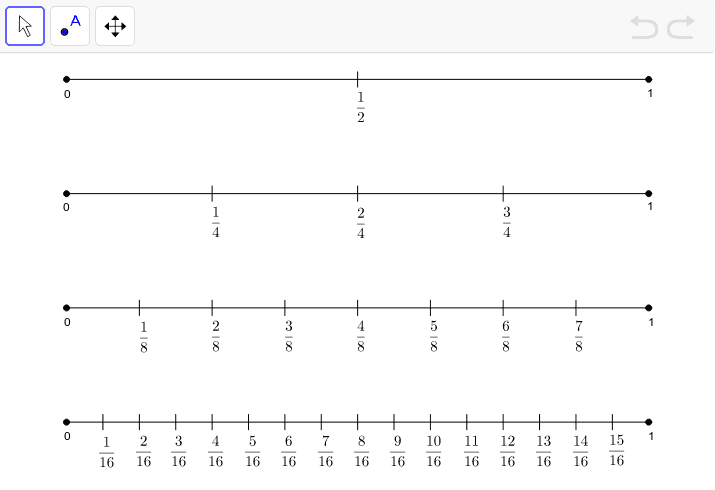
This example demonstrates the comparison and ordering of fractions by having students plot fractions on a number line and using benchmark fractions. Key mathematical concepts include fractions and their positions on the number line. The Segment command is used to draw line segments, suitable for upper elementary or middle school students learning to compare and order fractions.
GeoGebra Commands & Parameters
Segment(C, D) → bSegment(C_1, D_1) → b_1Segment(C_2, D_2) → b_2Segment(C_3, D_3) → b_3Segment(C_4, D_4) → b_4Segment(C_5, D_5) → b_5Segment(C_6, D_6) → b_6Segment(E, F) → aSegment(A, B) → cSegment(G, H) → dSegment(I, J) → eSegment(K, L) → fSegment(M, N) → gSegment(O, P) → hSegment(Q, R) → iSegment(S, T) → jSegment(U, V) → kSegment(W, Z) → lSegment(A_1, B_1) → mSegment(E_1, F_1) → nSegment(G_1, H_1) → pSegment(I_1, J_1) → qSegment(K_1, L_1) → rSegment(M_1, N_1) → sSegment(O_1, P_1) → tSegment(Q_1, R_1) → a_1Segment(S_1, T_1) → c_1Segment(U_1, V_1) → d_1Segment(W_1, Z_1) → e_1Segment(A_2, B_2) → f_1
AI Drawing Prompt Reference
Draw a number line and mark several fraction points such as 1/2, 1/4, 3/4, and connect them with line segments. Then draw reference points 0 and 1, and mark more fraction points like 2/3, 1/3, 5/6, and connect them with line segments. Finally, draw some auxiliary line segments to help compare and order these fractions.
The prompt above was compiled from the original drawing commands and is for reference only.