
Optimization of Rectangle Inscribed in a Circle
Loading the math board and drawing, please wait…
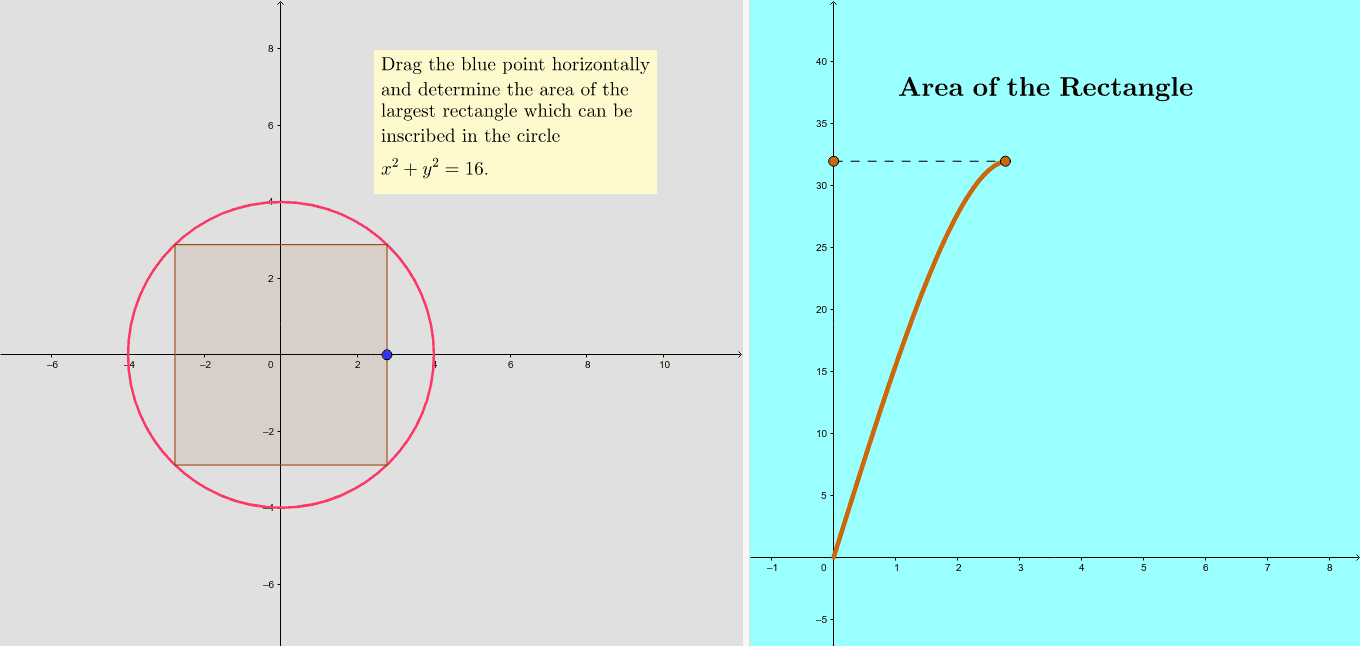
This example demonstrates constructing a rectangle inside a circle and using calculus to find its maximum area. Key mathematical concepts include circle, rectangle, quadratic equations, and derivatives. GeoGebra commands such as Circle, Segment, Point, Intersect, etc., are used for geometric construction. Suitable for high school math education and learning optimization problems in calculus.
GeoGebra Commands & Parameters
Circle((0, 0), 4) → cSegment((0, 0), (4, 0)) → aPoint(a) → ASegment((0, 0), A) → bOrthogonalLine(A, a) → dIntersect(c, d, 2) → BOrthogonalLine(B, d) → eIntersect(c, e, 2) → COrthogonalLine(C, e) → fIntersect(c, f, 2) → DOrthogonalLine(D, f) → gIntersect(d, g) → EPolygon(E, A, B, C, D) → poly1, e_1, a_1, b_1, c_1, d_1CurveCartesian(s, ((4 * s) * sqrt(16 - s^(2))), s, 0, b) → hSegment(G, F) → i
AI Drawing Prompt Reference
Draw a circle with center at the origin and radius 4. Inside this circle, construct an inscribed rectangle with one vertex on the horizontal radius. Use the segment from the origin to this vertex as one side of the rectangle, then draw perpendicular lines through this vertex to intersect the circle, creating the other three vertices in sequence. Connect these four vertices to form a rectangle whose center coincides with the circle's center. Additionally, plot a curve showing the rectangle's area as a function of one side length, with the horizontal axis representing side length and vertical axis representing corresponding area, demonstrating a parabolic relationship where area increases then decreases, illustrating the optimization problem of finding the maximum area of an inscribed rectangle in a circle.
The prompt above was compiled from the original drawing commands and is for reference only.