
Oblique Cone with Multiple Cutting Planes
Loading the math board and drawing, please wait…
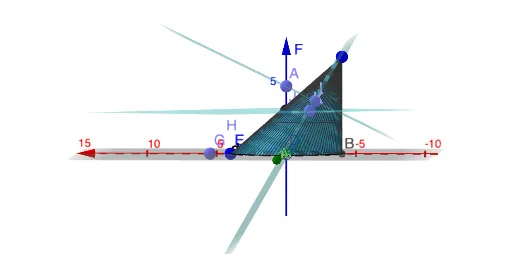
① This example demonstrates how multiple cutting planes intersect an oblique cone, revealing the varying cross-section shapes formed by different plane orientations. ② Core mathematical concepts include solid geometry, conic sections (ellipse, hyperbola, parabola), intersection of planes and curved surfaces, and spatial point/line/plane relationships. ③ Construction highlights: using GeoGebra commands such as Circle to create the base circle, Surface for the cone's lateral surface, Plane for cutting planes, Point and Intersect to compute intersection points and curves, PointIn to place points on surfaces, and a slider n to control the number or position of cutting planes for dynamic exploration. ④ Suitable for high school or early college students learning solid geometry and spatial analytic geometry, as well as for teachers demonstrating the dynamic generation of conic sections in the classroom.
GeoGebra Commands & Parameters
Circle(D, E) → dSurface((x(F) * u) + ((1 - u) * x(D)) + ((r * (1 - u)) * cos(v)), (y(F) * u) + ((1 - u) * y(D)) + ((r * (1 - u)) * sin(v)), (z(F) * u) + ((1 - u) * z(D)), u, 0, U, v, 0, V) → aPlane(F, yAxis) → pPoint(zAxis) → AIntersect(d, xAxis, 1) → BPointIn(p) → CPoint(xAxis) → GPoint(zAxis) → HPointIn(p) → IPlane(C, I, A) → qPoint(zAxis) → JPointIn(p) → KPointIn(p) → LPlane(J, K, L) → p_1
AI Drawing Prompt Reference
Draw an oblique cone and visualize its lateral surface, then introduce multiple cutting planes to observe how different plane orientations change the resulting cross-sections. Construct the base circle and build the cone’s surface from it. Add a reference plane (aligned with a chosen axis) and several other cutting planes determined by selecting points on the cone surface and reference directions, then compute the intersection curves between each plane and the cone’s surface. Include a slider to vary the number or position of the cutting planes so the displayed intersection shapes dynamically shift, illustrating ellipse-, hyperbola-, and parabola-like conic sections.
The prompt above was compiled from the original drawing commands and is for reference only.