
Numeric Derivative Demo
Loading the math board and drawing, please wait…
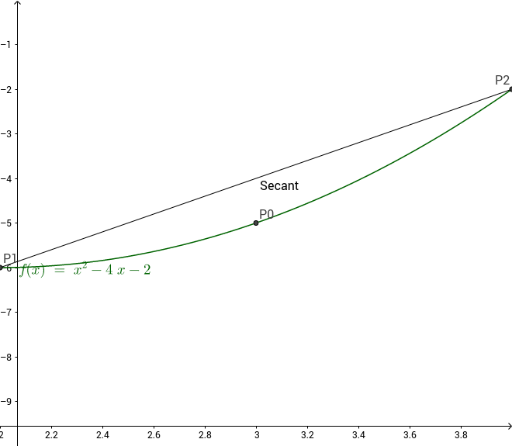
This example demonstrates the numeric derivative calculation by dynamically adjusting point positions to approximate the derivative. Core math concepts include derivative definition, straight lines, numerical approximation, polynomial functions, and numerical operations. Construction highlights involve using commands like Textfield and Segment to draw function curves, secant lines, and points, with objects such as c, fc, P0, epsilon, delta, P2, P1 for dynamic input and computation. InputBoxes (InputBoxC, InputBoxDelta, InputBoxEpsilon, InputBoxF), delx, dely, m, SecSeg, text1, text2, text3 are used for parameterized interaction and result display. Suitable for high school and above students to understand the geometric meaning and computation of derivatives, as well as for calculus teaching demonstrations.
GeoGebra Commands & Parameters
Textfield(c) → InputBoxCTextfield(delta) → InputBoxDeltaTextfield(epsilon) → InputBoxEpsilonTextfield(f) → InputBoxFSegment(P1, P2) → SecSeg
AI Drawing Prompt Reference
Create a dynamic diagram illustrating numerical derivatives. Show a function curve with two movable points on it, representing small increments in the independent and dependent variables. Draw a secant line through these points, whose slope approximates the derivative at that location. Include several input boxes to adjust the function expression, the increment value for the independent variable, and another related parameter, allowing real-time changes to the secant line's position and slope. Also display three text areas showing the secant slope, horizontal increment, and vertical increment values, to clarify the geometric meaning of the derivative definition. The layout should be clean and suitable for teaching.
The prompt above was compiled from the original drawing commands and is for reference only.