
Number Dots and Place Value by Duane Habecker
Loading the math board and drawing, please wait…
In collections
Elementary School Applets
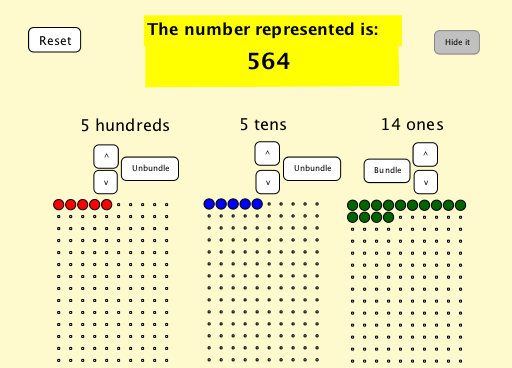
This example demonstrates the concept of place value using number dots, visually showing the decomposition and combination of digits. Core math concepts include place value, decimal system, and digit decomposition. It is constructed using commands like Flatten, Sequence, Mod, Textfield, Polygon, with objects A, B, C, and sliders for interactive place value display. Suitable for middle-high elementary mathematics teaching to help students understand number composition and place value operations.
GeoGebra Commands & Parameters
Flatten(Sequence[Sequence[(x(A) + (horizontalspacing * (i - 1)), y(A) - (verticalspacing * (j - 1))), i, 1, numberofcolumns], j, 1, numberofrows]) → arrayonesFlatten(Sequence[Sequence[(x(B) + (horizontalspacing * (i - 1)), y(B) - (verticalspacing * (j - 1))), i, 1, numberofcolumns], j, 1, numberofrows]) → arraytensFlatten(Sequence[Sequence[(x(C) + (horizontalspacing * (i - 1)), y(C) - (verticalspacing * (j - 1))), i, 1, numberofcolumns], j, 1, numberofrows]) → arrayhundredsSequence(Element[arrayones, i], i, 1, displayones) → dotsonesSequence(Element[arraytens, i], i, 1, displaytens) → dotstensSequence(Element[arrayhundreds, i], i, 1, displayhundreds) → dotshundredsMod(inputnumber, 10) → inputonesTextfield(inputtext) → enteranumberPolygon(D, E, F, G) → poly1, d, e, f, g
AI Drawing Prompt Reference
Draw a number dot array to show the decomposition and combination of digits in the ones, tens, and hundreds places. First, create an array of dots representing the ones place, then create another array for the tens place, and finally create an array for the hundreds place. Based on the input number, display the specific number of dots for the ones, tens, and hundreds, and use a polygon to mark the position of the input number.
The prompt above was compiled from the original drawing commands and is for reference only.