
Nested Sequence Surfaces Bug Example
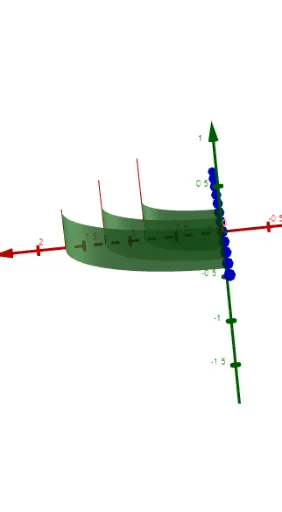
Loading the math board and drawing, please wait…
This example demonstrates a bug scenario in GeoGebra when constructing surfaces using nested Sequence commands, where the surface output deviates from expectations due to improper parameter propagation between inner and outer sequences. The core mathematical concepts involve sequences, surfaces, derivatives, and geometric transformations, with connections to the Pythagorean theorem and set theory. The construction uses commands such as Point, Polynomial, and Sequence, involving objects like a, n, b, B, C, A, f, α, Δx, g, p, L_6, l, m, and L_9. This example is suitable for high school or university students and teachers learning advanced GeoGebra scripting, nested sequence logic, and debugging mathematical visualizations. It serves as a reference for understanding how sequence scoping and parameter dependencies affect graphical generation, and for troubleshooting similar issues in dynamic geometry environments.
GeoGebra Commands & Parameters
Point(xAxis) → CPoint(yAxis) → APolynomial({A, B, C}) → fSequence(CurveCartesian[a + ((r + 1) * Δx), t, t, 0, p(a + (((2 * r) + 1) * Δx / 2))], r, 0, n - 1, 1) → L_6Sequence(Surface[Element[L_6, w], α, yAxis], w, 1, n) → L_9
AI Drawing Prompt Reference
Draw a surface generated by nested sequences to demonstrate a bug in parameter propagation. Start by plotting points on the x and y axes, then construct a polynomial function based on these points. Use sequence commands to generate a series of curves that depend on the function values and parameter changes, finally creating surfaces along the y-axis from these curves to observe any deviations from expectations.
The prompt above was compiled from the original drawing commands and is for reference only.