
Mushroom Growth Simulation
Loading the math board and drawing, please wait…
In collections
My 3D Collection
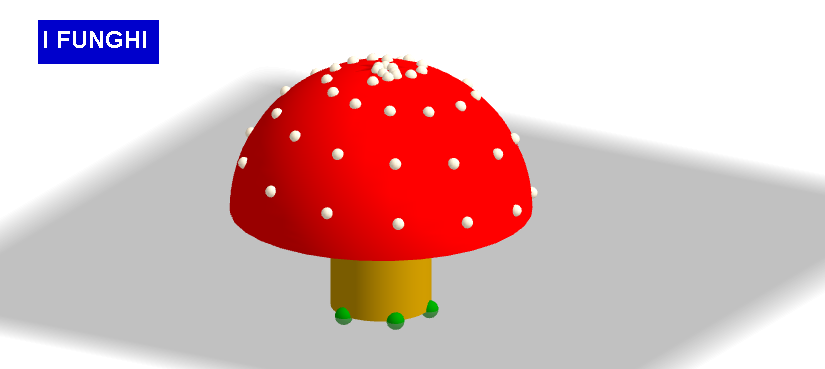
This GeoGebra example simulates mushroom growth by selecting three points and activating the Fungus command. Key mathematical concepts include points, distance, and locus. Commands used include Circle, Center, Distance, OrthogonalLine, Sphere, Intersect, Cylinder, Surface, and Sequence. Suitable for middle school and above students for geometric construction and dynamic observation.
GeoGebra Commands & Parameters
Circle(A, B, C) → cCenter(c) → ODistance(O, A) → raggioOrthogonalLine(O, xOyPlane) → aSphere(O, (2 * raggio)) → bIntersect(a, b) → D, ECylinder(O, E, raggio) → d, e, f, gSphere(E, (3 * raggio)) → hCircle(E, (3 * raggio), a) → kSurface(x(E) + (((3 * raggio) * cos(u)) * cos(v)), y(E) + (((3 * raggio) * cos(u)) * sin(v)), z(E) + ((3 * raggio) * sin(u)), u, 0, 1.5707963267948966, v, 0, 6.283185307179586) → iSequence(Sequence[E + ((3 * raggio) * ((cos(u + v / 10) * sin(v)), (cos(u + v / 10) * cos(v)), sin(u + v / 10))), u, 0, 1.5, 0.4], v, 0, 6.3, 0.5) → puntini
AI Drawing Prompt Reference
Draw a simulation of mushroom growth. First, select three points as starting points. Then, create a circle with a center at one of these points and a radius equal to the distance. Next, draw a line perpendicular to the center. Then, create a sphere with a radius twice the distance. Finally, find the intersection of the line and the sphere, and use this to construct a cylinder. Next, create a larger sphere and a circle. Then, generate a surface using these points, radius, and angle parameters. Finally, add a series of points to form a spiral structure. The entire graph should show the growth of a mushroom from points to sphere to surface and points.
The prompt above was compiled from the original drawing commands and is for reference only.