
Multiplying Fractions with Area Model by Duane Habecker
Loading the math board and drawing, please wait…
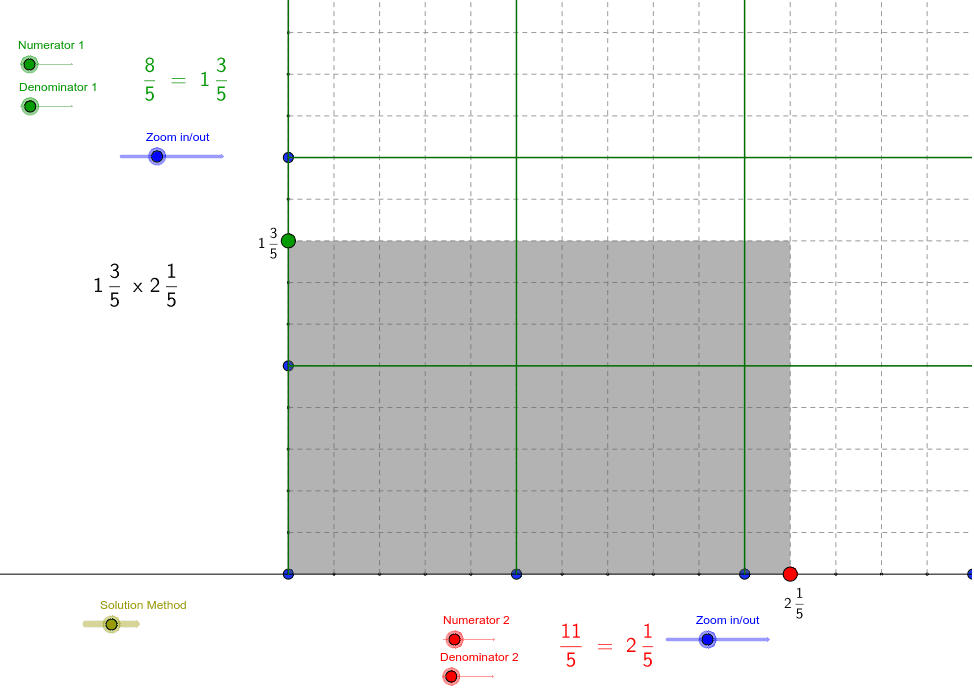
This GeoGebra applet demonstrates fraction multiplication using a rectangular area model, visually showing how the product of two fractions corresponds to the area of a sub-region within a unit rectangle and explaining why the standard fraction multiplication algorithm makes sense. Core mathematical concepts include fraction multiplication, area models, equivalent fractions, simplifying fractions, greatest common divisor (GCD), and least common multiple (LCM). The construction relies on GeoGebra commands such as Point, Sequence, Polygon, LCM, and GCD, together with objects like numerator, denominator, unitsize, numberofwholes, poly1, polyWhole, and grid coordinate variables to control fraction parameters and render the multiplicand, multiplier, and product regions. It is suitable for upper elementary and middle school mathematics instruction, supporting teacher-led classroom demonstrations and student-centered inquiry into the geometric foundation of fraction arithmetic.
GeoGebra Commands & Parameters
Point(a) → ASequence((x(A) + i * denominatorsize, y(A)), i, 0, denominator * numberofwholes) → list1Sequence((x(A) + i * unitsize, y(A)), i, 0, numberofwholes) → list2Sequence((x(A), y(A) + i * denominatorsizev), i, 1, denominatorv * numberofwholesv) → list3Sequence((x(A), y(A) + i * unitsizev), i, 1, numberofwholesv) → list4Sequence(Segment[Element[list2, i], Element[list2, i] + (0, numberofwholesv * unitsizev)], i, 1, numberofwholes + 1) → UnitLongitudeSequence(Segment[Element[list4, i], Element[list4, i] + (numberofwholes * unitsize, 0)], i, 1, numberofwholesv + 1) → UnitLatitudePolygon(A, B, OuterUpperRight, C) → poly1, a_1, b, upperright, cSequence(Segment[Element[list1, i], Element[list1, i] + (0, numberofwholesv * unitsizev)], i, 1, denominator * (numberofwholes + 1)) → GridLongitudeSequence(Segment[Element[list3, i], Element[list3, i] + (numberofwholes * unitsize, 0)], i, 1, denominatorv * (numberofwholesv + 1)) → GridLatitudePolygon(A, LowerRight, UpperRight, UpperLeft) → polyWhole, a_2, lowerright, upperright_1, upperleftPolygon(UpperLeft, UpperRight, OuterUpperMid, C) → polyUpper, upperleft_1, upperright_2, outeruppermid, c_1Polygon(LowerRight, B, RightUpperMid, UpperRight) → polyRight, lowerright_1, b_1, rightuppermid, upperright_3Polygon(UpperRight, RightUpperMid, OuterUpperRight, OuterUpperMid) → polyCorner, upperright_4, rightuppermid_1, outerupperright, outeruppermid_1LCM(denomList) → commondenominatorGCD(numanswerTEMP, commondenominator) → reducebyGCD(commondenominator, numanswerTEMPTWO) → reducebyTWO
AI Drawing Prompt Reference
Starting from a base point, draw a unit rectangle and subdivide it horizontally and vertically according to the denominators of two fractions, creating a grid of equal small rectangles; add thicker grid lines at integer multiples to mark whole units; then shade a horizontal strip for the first fraction, a vertical strip for the second fraction, and their overlapping region for the product; also complete surrounding whole‑number rectangles above, to the right, and at the corner to illustrate the area model of fraction multiplication and the simplification step.
The prompt above was compiled from the original drawing commands and is for reference only.