
Multiplying Fractions Visualized with Spheres and Symmetry
Loading the math board and drawing, please wait…
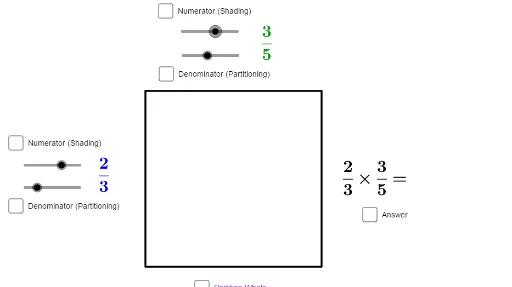
This GeoGebra example provides a dynamic visual model for demonstrating fraction multiplication. It uses spheres, power functions, symmetry, and polygon areas to represent the product of two fractions geometrically, making abstract arithmetic operations tangible. The construction employs commands such as Intersect, Point, Polygon, and Sequence to generate multiple objects including points A, B, C, D, polygons poly1, poly2, poly3, lists list1 through list4, and text objects text1 and text2 that display the multiplication result. Suitable for upper elementary and middle school students learning fraction operations, as well as for teachers demonstrating the concept in class. By manipulating sliders or parameters, learners can observe how the product changes, reinforcing understanding of fraction multiplication and spatial reasoning.
GeoGebra Commands & Parameters
Intersect(xAxis, yAxis) → APoint(xAxis) → BPolygon(A, B, 4) → poly1, f, g, h, j, C, DSequence((x(B), y(B) + (i * g / d)), i, 0, d) → pointrightSequence((x(A), y(A) + (i * j / d)), i, 0, d) → pointleftSequence(Segment[Element[pointleft, i], Element[pointright, i]], i, 1, d + 1) → list2Sequence((x(D) + (i * h / b), y(D)), i, 0, b) → pointtopSequence((x(A) + (i * f / b), y(A)), i, 0, b) → pointbottomSequence(Segment[Element[pointtop, i], Element[pointbottom, i]], i, 1, b + 1) → list1Intersect(Element[list1, a + 1], Element[list2, c + 1]) → EPolygon(A, D, Element[pointtop, a + 1], Element[pointbottom, a + 1]) → poly2, a_1, d_1, i, kPolygon(A, Element[pointbottom, a + 1], E, Element[pointleft, c + 1]) → poly3, p, q, r, sIntersect(Element[list1, a + 1], f) → FSequence((x(F), y(F) + (i * g / d)), i, 0, d) → list3Sequence(Segment[Element[pointleft, i], Element[list3, i]], i, 1, d + 1) → list4
AI Drawing Prompt Reference
Draw a coordinate plane with a square whose lower-left corner is at the origin and sides aligned with the axes. Inside the square, create a grid by drawing equally spaced horizontal lines from the left side and vertical lines from the bottom side, forming intersection points. Choose one intersection point as a key vertex, then use polygons to shade two rectangular regions that represent the product of two fractions. Add text labels above and to the left of the square showing the multiplication result. Use a clean geometric style emphasizing the area-fraction relationship.
The prompt above was compiled from the original drawing commands and is for reference only.