
Multiplication and Division with Multiples of Powers of Ten
Loading the math board and drawing, please wait…
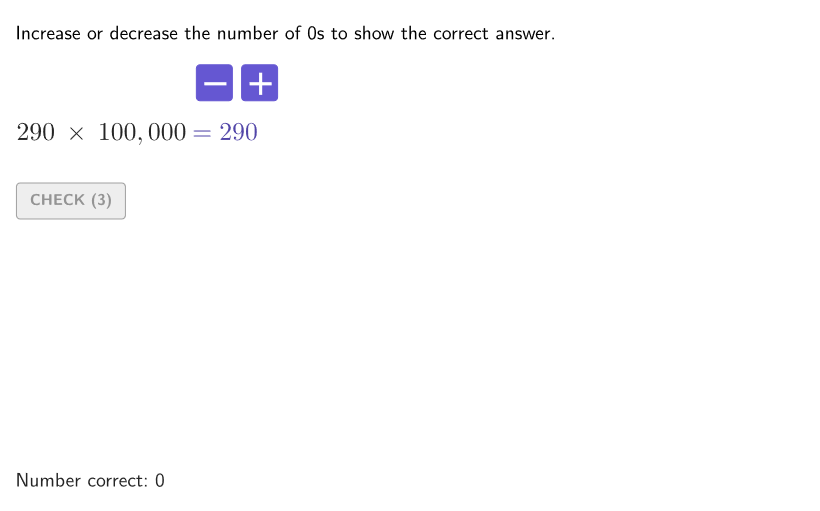
This example demonstrates how to multiply and divide with multiples of powers of ten. By searching for patterns in the number of zeros in the results, you can quickly find the products or quotients. The core math concepts involved are recognizing and using patterns in powers of ten (with or without exponents) to multiply and divide whole numbers and decimals. The construction utilizes GeoGebra commands and objects such as Shuffle, Element, Reverse, If, UnicodeToText, Sequence, Take, Textfield, Polygon, Corner, expandSegment, onboardingTextOffset. It is suitable for students in grades 4-5 to practice and master the skills of multiplying and dividing powers of ten.
GeoGebra Commands & Parameters
Shuffle(Sequence[100, 400, 10]) → allBases, {290, 240, 370, 400, 230, 340, 120, 150, 350, 390, 200, 190, 260, 140, 320, 330, 100, 170, 180, 160, 360, 270, 280, 310, 110, 130, 250, 300, 380, 220, 210}Element(allBases, Mod[countQuestion, Length[allBases]] + 1) → baseShuffle(Sequence[2, 5, 1]) → allN, {5, 2, 3, 4}Element(allN, Mod[countQuestion, Length[allN]] + 1) → numNShuffle(KeepIf[x ≤ numN, {2, 3, 4, 5}]) → allD, {2, 4, 3, 5}Element(allD, Mod[countQuestion, Length[allD]] + 1) → numDShuffle({1, 2}) → allCases, {2, 1}Element(allCases, Mod[countQuestion, Length[allCases]] + 1) → caseNumReverse(TextToUnicode[("" * secondNum2)]) → secondNum2RUReverse(RemoveUndefined[Flatten[Sequence[{secondNum2RU(k), secondNum2RU(k + 1), secondNum2RU(k + 2), 44}, k, 1, Length[secondNum2RU], 3]]]) → secondNum2CIf(secondNum2C(1) ≟ 44, Take[secondNum2C, 2], secondNum2C) → secondNum2OKUnicodeToText(secondNum2OK) → textSecondNum2Reverse(TextToUnicode[("" * secondNum1)]) → secondNum1RUReverse(RemoveUndefined[Flatten[Sequence[{secondNum1RU(k), secondNum1RU(k + 1), secondNum1RU(k + 2), 44}, k, 1, Length[secondNum1RU], 3]]]) → secondNum1CIf(secondNum1C(1) ≟ 44, Take[secondNum1C, 2], secondNum1C) → secondNum1OKUnicodeToText(secondNum1OK) → textSecondNum1Sequence(Random[0, 99] / 100, A, 1, 200) → allRandomSeeds, {0.21, 0.43, 0.13, 0.69, 0.53, 0.48, 0.58, 0.75, 0.79, 0.29, 0.93, 0.83, 0.81, 0.52, 0.6, 0.17, 0.91, 0.55, 0.8, 0.2, 0.47, 0.28, 0.1, 0.53, 0.53, 0.53, 0.3, 0.7, 0.55, 0.58, 0.55, 0.2, 0.3, 0.61, 0.51, 0.62, 0.29, 0.52, 0.21, 0.01, 0.9, 0.14, 0.52, 0.6, 0.28, 0.27, 0.98, 0.49, 0.81, 0.18, 0.18, 0.67, 0.57, 0.25, 0.84, 0.79, 0.39, 0.04, 0.76, 0.74, 0.91, 0.95, 0.19, 0.69, 0.81, 0.54, 0.82, 0.32, 0.78, 0.31, 0.39, 0.45, 0.28, 0.3, 0.06, 0.76, 0.13, 0.14, 0.32, 0.4, 0.73, 0.61, 0.68, 0.37, 0.81, 0.22, 0.96, 0.5, 0.22, 0.23, 0.99, 0.79, 0.13, 0.17, 0.81, 0.91, 0.57, 0.36, 0.42, 0.95, 0.82, 0.04, 0.13, 0.39, 0.65, 0.86, 0.98, 0.83, 0.18, 0.81, 0.59, 0.66, 0.53, 0.96, 0.29, 0.27, 0.86, 0.16, 0.33, 0.92, 0.92, 0.56, 0.25, 0.8, 0.86, 0.81, 0.46, 0.46, 0.3, 0.17, 0.89, 0.08, 0.9, 0.08, 0.47, 0.62, 0.35, 0.97, 0.8, 0.63, 0.24, 0.51, 0.88, 0.43, 0.36, 0.35, 0.41, 0.39, 0.54, 0.63, 0.53, 0.74, 0.39, 0.53, 0.77, 0.09, 0.02, 0.66, 0.06, 0.89, 0.24, 0.39, 0.2, 0.06, 0.69, 0.7, 0.77, 0.71, 0.83, 0.18, 0.33, 0.3, 0.66, 0.36, 0.85, 0.5, 0.02, 0.38, 0.8, 0.35, 0.62, 0.62, 0.06, 0.16, 0.02, 0.24, 0.84, 0.94, 0.64, 0.97, 0.61, 0.41, 0.43, 0.04, 0.81, 0.53, 0.32, 0.79, 0.11, 0.07}Take(allRandomSeeds, randIndex, randIndex + numRandoms - 1) → currentRandomSeedsTextfield(input1) → InputBox1Textfield(input2) → InputBox2Polygon(Zip[PixelsToPoint[Corner[1], Corner[3], Corner[5], A], A, {(pixelsLeft, pixelsTop), (pixelsLeft, y(Corner[5]) - pixelsBottom), Corner[5] - (pixelsRight, pixelsBottom), (x(Corner[5]) - pixelsRight, pixelsTop)}]) → borderBoxCorner(5) → layoutAppSizeexpandSegment(PMoveA, PMoveB, (pulsing * 7), Corner[1], Corner[3], Corner[5]) → pulsingObjectonboardingTextOffset(Corner[onboardingText, 1], Corner[onboardingText, 3], onboardingCase, Corner[1], Corner[3], Corner[5]) → OnboardingTextOffsetReverse(TextToUnicode[("" * input1)]) → input1RUReverse(RemoveUndefined[Flatten[Sequence[{input1RU(k), input1RU(k + 1), input1RU(k + 2), 44}, k, 1, Length[input1RU], 3]]]) → input1UCIf(input1UC(1) ≟ 44, Take[input1UC, 2], input1UC) → input1OKUnicodeToText(input1OK) → textInputReverse(TextToUnicode[("" * firstNum1)]) → firstNum1RUReverse(RemoveUndefined[Flatten[Sequence[{firstNum1RU(k), firstNum1RU(k + 1), firstNum1RU(k + 2), 44}, k, 1, Length[firstNum1RU], 3]]]) → firstNum1CIf(firstNum1C(1) ≟ 44, Take[firstNum1C, 2], firstNum1C) → firstNum1OKUnicodeToText(firstNum1OK) → textFirstNum1Reverse(TextToUnicode[("" * ans1)]) → ans1RUReverse(RemoveUndefined[Flatten[Sequence[{ans1RU(k), ans1RU(k + 1), ans1RU(k + 2), 44}, k, 1, Length[ans1RU], 3]]]) → ans1CIf(ans1C(1) ≟ 44, Take[ans1C, 2], ans1C) → ans1OKReverse(TextToUnicode[("" * ans2)]) → ans2RUReverse(RemoveUndefined[Flatten[Sequence[{ans2RU(k), ans2RU(k + 1), ans2RU(k + 2), 44}, k, 1, Length[ans2RU], 3]]]) → ans2CIf(ans2C(1) ≟ 44, Take[ans2C, 2], ans2C) → ans2OKUnicodeToText(ans1OK) → textAns1UnicodeToText(ans2OK) → textAns2Reverse(RemoveUndefined[Flatten[Sequence[{firstNum1RU(k), firstNum1RU(k + 1), firstNum1RU(k + 2), 44}, k, 1, Length[firstNum1RU], 3]]]) → test
AI Drawing Prompt Reference
Draw an interactive multiplication and division practice interface. The interface should include two input boxes for entering numbers, a border frame around the input area, a pulsing animation moving slowly within the frame, a guidance text to prompt user actions, and some number and answer display areas. The graphic should clearly show the flow of input, calculation, and result feedback, suitable for students to practice and understand patterns in multiplying and dividing powers of ten.
The prompt above was compiled from the original drawing commands and is for reference only.