
MTH241 Parametric Surfaces: Interactive Exploration and Construction
Loading the math board and drawing, please wait…
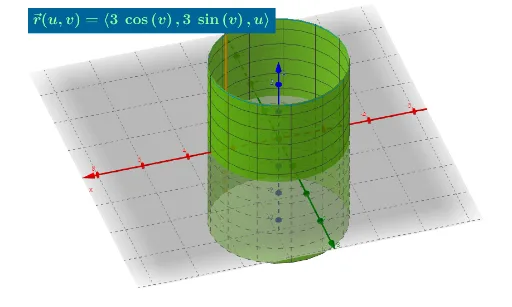
①This example demonstrates how to construct a three-dimensional parametric surface using parametric equations, with interactive input boxes allowing dynamic adjustment of parameters to visualize shape changes. ②Core mathematical concepts include parametric surfaces, parameter domains (u,v intervals), curves on surfaces (horizontal section curves), and the connection between parametric equations and geometric objects such as polygons and segments. ③Construction highlights: uses GeoGebra commands like Polygon, Segment, CurveCartesian, and Surface to create base geometric elements and the surface; employs Textfield and InputBox objects to provide user input for parameters ua, ub, va, vb, and function f; also includes SegPlaneHorizontal and SectionCurveHorizonta to generate horizontal cross-sections, aiding in understanding surface structure. ④Suitable for university-level multivariable calculus courses (e.g., MTH241) to explain parametric surfaces, or for advanced high school mathematics and teacher demonstrations to foster spatial visualization and parametric thinking.
GeoGebra Commands & Parameters
Polygon((ua, va), (ub, va), (ub, vb), (ua, vb)) → q1, i, j, k, lSegment((U, va), (U, vb)) → mSegment((ua, V), (ub, V)) → SegPlaneHorizontalCurveCartesian(f(s, V), g(s, V), h(s, V), s, ua, ub) → SectionCurveHorizontaCurveCartesian(f(U, t), g(U, t), h(U, t), t, va, vb) → bSurface(f(u, v), g(u, v), h(u, v), u, ua, ub, v, va, vb) → aTextfield(ua) → InputBox1Textfield(ub) → InputBox2Textfield(va) → InputBox3Textfield(vb) → InputBox4Textfield(f) → InputBox5Textfield(g) → InputBox6Textfield(h) → InputBox7