
Measuring the White House Width
Loading the math board and drawing, please wait…
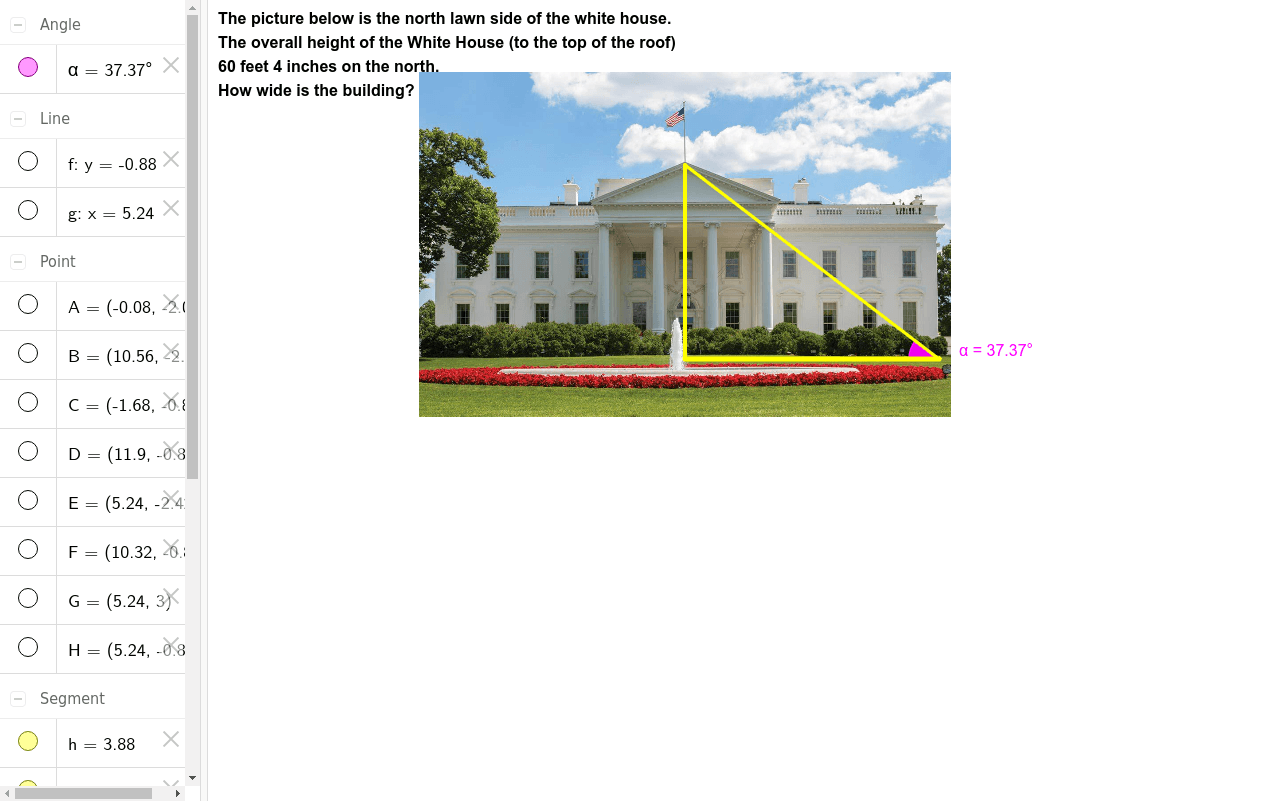
This example demonstrates how to calculate the width of the White House by constructing geometric figures. It involves core math concepts like Statistics, Geometric Mean, Dilation, Perimeter, and Geometric Construction. The construction uses commands such as Line, OrthogonalLine, Point, Intersect, Segment, and Angle in GeoGebra. Suitable for high school mathematics education to understand geometric transformations and measurement techniques.
GeoGebra Commands & Parameters
Line(C, D) → fOrthogonalLine(E, f) → gPoint(f) → FPoint(g) → GIntersect(f, g) → HSegment(G, H) → hSegment(H, F) → iSegment(F, G) → jAngle(G, F, H) → α
AI Drawing Prompt Reference
Draw a geometric figure by starting with line CD, then draw a perpendicular line from point E intersecting CD at points F and G, connect FG, GH, and HF, and measure the angle at G FH to demonstrate the geometric construction and measurement.
The prompt above was compiled from the original drawing commands and is for reference only.