
Measuring Angles Using Protractor: Interactive Geometry Demo
Loading the math board and drawing, please wait…
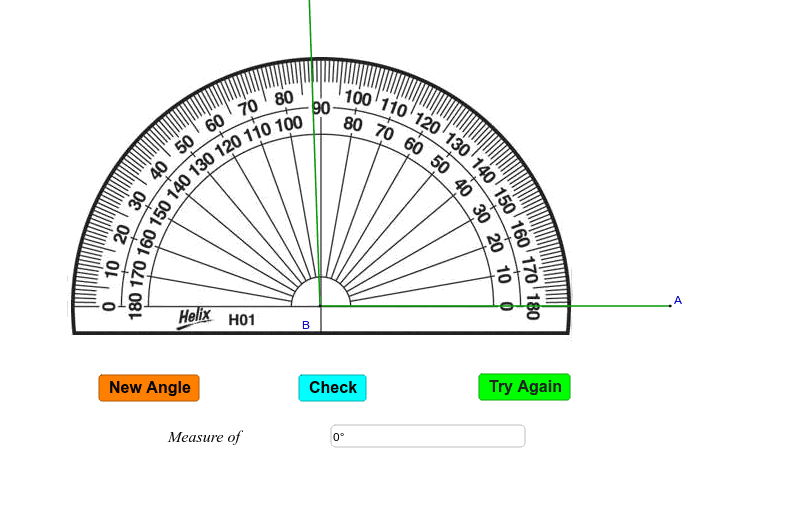
① This GeoGebra example dynamically simulates the process of measuring an angle with a protractor, showing how to read the degree value directly. ② The core mathematical concept is angle measurement, involving the vertex, sides of the angle, and alignment with the protractor's scale, while also touching on relationships within geometric figures like triangles. ③ Construction highlights: The Random command generates random angles; Point, Segment, and Rotate build the angle's sides; Angle displays the measure; Textfield, Corner, and LaTeX create interactive input boxes and labels; buttons (button1-3) control randomization or reset; multiple image objects (pic1-pic4) represent the protractor visual. ④ Suitable for upper elementary to middle school students learning angle basics, and useful for teacher-led demonstrations or self-paced exploration to build geometric intuition and hands-on skills.
GeoGebra Commands & Parameters
Random(10, 170) → nIntersect(xAxis, yAxis) → BPoint(xAxis) → ARotate(A, n°, B) → CAngle(A, B, C) → βSegment(A, B) → aSegment(B, C) → bTextfield(γ) → inputBox1Corner(5) → DLaTeX(D, true, true) → text4LaTeX(D, true, true) → text5
AI Drawing Prompt Reference
Draw an interactive geometry demo showing angle measurement with a protractor. Start with a horizontal baseline representing the protractor's flat edge, with a vertex at its center. From this vertex, draw two rays forming a random angle between 10 and 170 degrees. Label the angle with its degree measure, and include a text input box where the value can be edited. The protractor is depicted as a semicircular arc with tick marks, aligned so its center matches the vertex and its baseline matches one side of the angle. Add a button to generate a new random angle and a reset button. Keep the layout clear for classroom use.
The prompt above was compiled from the original drawing commands and is for reference only.