
Maximizing the Area of a Rectangle with Fixed Perimeter
Loading the math board and drawing, please wait…
In collections
Geo&Alg:Area Volume Pythagorean Th.
Math Year 4 Unit Probability & Statistics
Grade 12 Calculus & Vectors MCV4U1
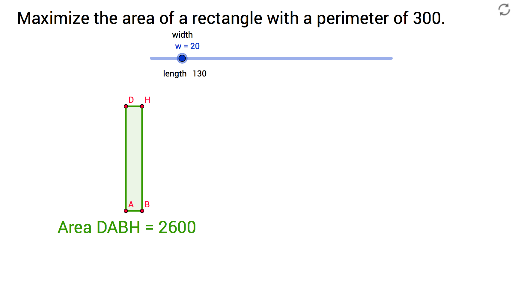
This example demonstrates how to find the rectangle of maximum area given a fixed perimeter by interactively adjusting its side lengths. It explores key concepts such as the area‑perimeter relationship, optimization techniques, and the use of derivatives or inequality methods to locate extrema. The GeoGebra construction employs commands like Point, Segment, OrthogonalLine, Circle, Intersect, Polygon, and Text to build a dynamic rectangle and display its area in real time. Designed for high‑school students and teachers, it supports lessons on optimization, mathematical modeling, and inquiry‑based learning, providing an intuitive visual grasp of extremum principles.
GeoGebra Commands & Parameters
Point(Circle[A, w]) → BSegment(A, B) → aOrthogonalLine(A, a) → bOrthogonalLine(B, a) → cCircle(A, length) → dCircle(A, length) → eIntersect(d, b) → C, DIntersect(e, c) → E, FCircle(B, length) → fIntersect(f, c) → G, HPolygon(D, A, B, H) → poly1, d_1, a_1, b_1, hText(length) → text1
AI Drawing Prompt Reference
Draw a variable rectangle with a fixed perimeter. Start with a circle centered at A of radius w, pick point B on the circle to form side AB. Construct perpendicular lines to AB through A and B. Then draw circles centered at A and B with a given radius (half the perimeter) intersecting those perpendiculars to locate the opposite vertices D and H. Connect D‑A‑B‑H to complete the rectangle and display its area dynamically.
The prompt above was compiled from the original drawing commands and is for reference only.