
Matrix Transformations Demo by Rob Butler
Loading the math board and drawing, please wait…
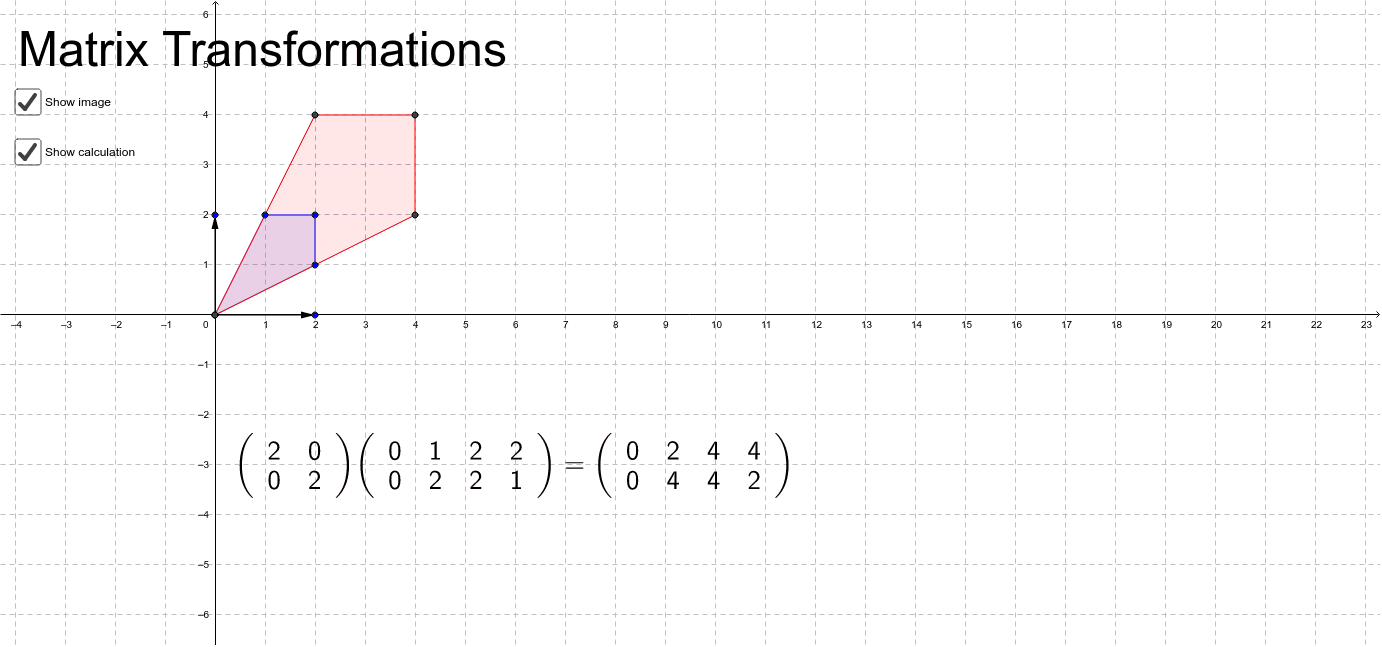
This example demonstrates how adjustable vectors change a matrix and visualizes the resulting transformation. It involves core math concepts like matrix transformations and linear algebra. Constructed using GeoGebra commands such as Intersect, Vector, and Polygon. Suitable for high school students and math enthusiasts learning about matrix properties and applications.
GeoGebra Commands & Parameters
Intersect(xAxis, yAxis) → CVector(C, B) → uVector(C, A) → vPolygon(D, E, F, G) → poly1, d_1, e, f, gPolygon(D, K, J, I) → poly2, d_2, k, j, i
AI Drawing Prompt Reference
Draw a coordinate plane with the origin at center. From the origin, create two adjustable vectors pointing to two points, representing the columns of a matrix. Then draw two quadrilaterals: one with four vertices as the original shape, and another with four transformed vertices as the result of the matrix applied. The two quadrilaterals share a vertex near the origin, and the transformed one is formed by linear combinations of the original vertices with the vectors. Use distinct colors for original and transformed shapes, and label the vector arrows.
The prompt above was compiled from the original drawing commands and is for reference only.