
Math Art Inspired by Dr. Strange
Loading the math board and drawing, please wait…
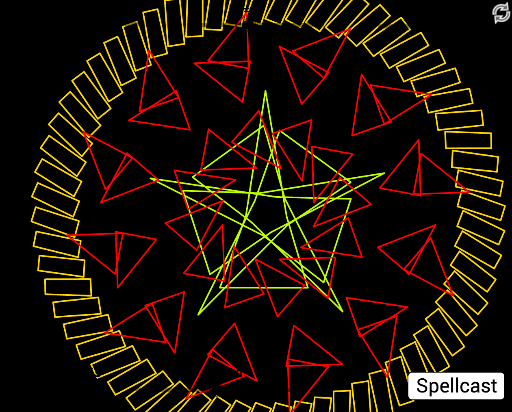
This example demonstrates a math art modeled after Dr. Strange, showcasing polygon construction, rotation, and combination using GeoGebra. It involves core math concepts like polygons, rotation transformations, function graphs, orthocenter, sequence generation, and geometric constructions. Key GeoGebra commands and objects used include Polygon, Sequence, LCM, and more. Suitable for high school students and above to explore geometric transformations, function graphs, and creative math art integration.
GeoGebra Commands & Parameters
Polygon(C, D, E, F, G) → poly1, c, d, e, f, gPolygon(H, I, J) → poly2, j, h, iPolygon(L_1, O, P, Q) → poly3, l, o, p, qSequence(Polygon[Rotate[C, (((i + t) * 360) * ° / N), A], Rotate[D, (((i + t) * 360) * ° / N), A], Rotate[E, (((i + t) * 360) * ° / N), A], Rotate[F, (((i + t) * 360) * ° / N), A], Rotate[G, (((i + t) * 360) * ° / N), A]], i, 1, N) → list1Sequence(Polygon[Rotate[H, (((i + t) * 360) * ° / M), B], Rotate[I, (((i + t) * 360) * ° / M), B], Rotate[J, (((i + t) * 360) * ° / M), B]], i, 1, M) → list2LCM(N, K) → aSequence(Polygon[Rotate[L_1, (((i + t) * 360) * ° / a), A], Rotate[O, (((i + t) * 360) * ° / a), A], Rotate[P, (((i + t) * 360) * ° / a), A], Rotate[Q, (((i + t) * 360) * ° / a), A]], i, 1, a) → list3Sequence(Rotate[list2, (((i + t) * 360) * ° / K), A], i, 1, K) → list4