
Mambo Variations on Frank Stella: Visual Math Art Demo
Loading the math board and drawing, please wait…
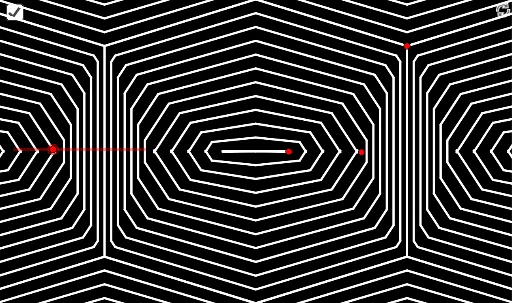
This example demonstrates a dynamic mathematical visualization inspired by Frank Stella's Op Art, creating a Mambo-style variation. It involves core math concepts like symmetry, matrices, median lines, algebra, scalene triangles, and function graphing. Construction highlights include GeoGebra commands such as Sequence, Segment, Rotate, Mirror, and Translate. Suitable for high school and above, exploring transformation geometry and function visualization.
GeoGebra Commands & Parameters
Sequence(((1 - i / n) * C) + (i / n * E), i, 0, n) → l4Sequence((i / ((2 * n)) * B) + ((1 - i / ((2 * n))) * A), i, 0, (2 * n)) → l1Segment(C, D) → fSegment(D, E) → gRotate(C, (-(180° - Angle[C, D, E])), D) → C'Rotate(E, 180° - Angle[C, D, E], D) → E'Sequence(If[i / n ≤ a, ((1 - i / n) * C) + (i / n * E'), ((1 - i / n) * C') + (i / n * E)], i, 0, n) → l2Sequence(Segment[Element[l1, (2 * n) - i + 2], Element[l4, i]], i, 1, n + 1) → l3Mirror(l3, h) → l3'Sequence(Segment[Element[l4, i], Element[l2, i]], i, 1, n + 1) → l5Mirror(l5, h) → l5'Sequence(Segment[Element[l2, i], Mirror[Element[l2, i], h]], i, 1, n + 1) → l6Mirror({l3, l5, l3', l5', l6}, x = x(A)) → l7Mirror(l7, x = x(Mirror[C, x = x(A)])) → l7'Mirror(l7', x = x(A)) → l7''Mirror(l7, x = x(C)) → l7'_1Mirror(l7'_1, x = x(A)) → l8Translate({l7, l9}, C - A) → l10Mirror(l10, h) → l10'Mirror(l10, x = x(A)) → l10'_1Mirror(l10', x = x(A)) → l10''
AI Drawing Prompt Reference
Create a dynamic mathematical visualization inspired by Frank Stella's Op Art, showcasing symmetry and matrix transformations. Begin by drawing two core lines, then generate a series of triangles based on them. Rotate, mirror, and translate these triangles to create a complex geometric pattern. Use a slider to control transformation parameters, resulting in a hexagonally symmetric complex design that emphasizes transformation geometry and function visualization.
The prompt above was compiled from the original drawing commands and is for reference only.