
Lines in a Triangle
Loading the math board and drawing, please wait…
In collections
Concurrency
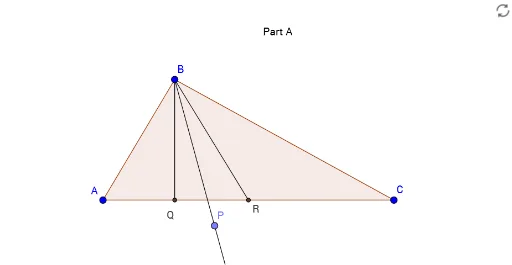
This example demonstrates the construction of various geometric lines within and around a triangle, including orthogonal lines and angle bisectors. Core mathematical concepts involve vectors, coordinate geometry, geometric construction, slope calculations, and differences. It utilizes commands like Polygon, OrthogonalLine, AngularBisector, Midpoint, Segment, Point, Ray, Line, and Intersect in GeoGebra for construction. Suitable for high school and above students to understand geometric constructions and spatial relationships.
GeoGebra Commands & Parameters
Polygon(A, B, C) → poly1, c, a, bOrthogonalLine(B, b) → fAngularBisector(A, B, C) → gMidpoint(A, C) → RSegment(B, R) → hPoint(g) → PRay(B, P) → jLine(A, C) → iOrthogonalLine(B, i) → kIntersect(k, i) → QSegment(B, Q) → l
AI Drawing Prompt Reference
Draw a triangle. From one vertex, construct a perpendicular line to the opposite side, creating a perpendicular segment. Then construct the angle bisector of the interior angle at that vertex, and pick a point on this bisector. From the same vertex, draw a ray passing through that point. Next, take the midpoint of another side of the triangle)Skip the midpoint of the side not containing the vertex, and connect that midpoint to the vertex, forming a median. Finally, from the same vertex, drop a perpendicular to the base side, marking the foot of the perpendicular, and connect the vertex to that foot, creating another perpendicular segment. The final figure includes the triangle, two perpendicular segments, one angle bisector, one ray, and one median.
The prompt above was compiled from the original drawing commands and is for reference only.