
Line Equation Format Converter
Loading the math board and drawing, please wait…
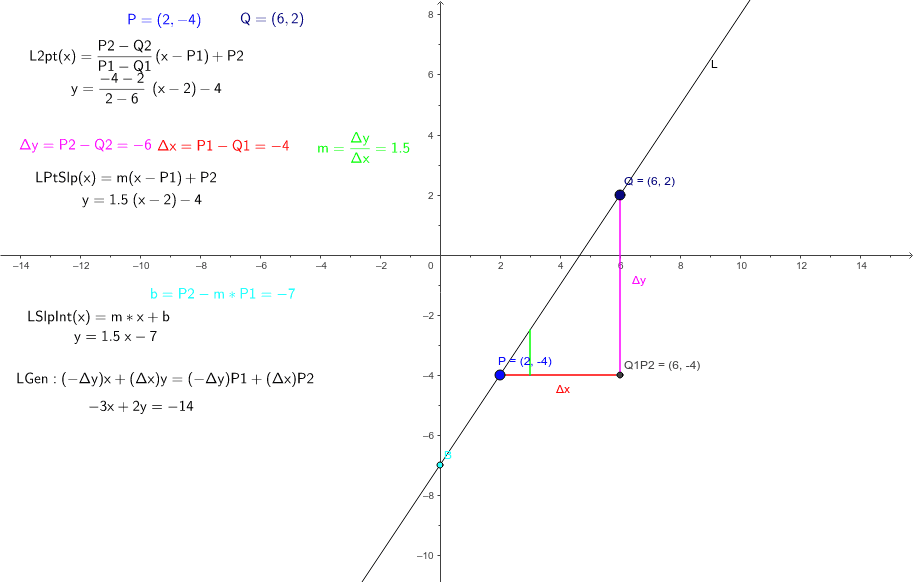
This applet demonstrates how to define a line using two points and then convert its equation among point-slope, slope-intercept, and general forms. Core math concepts include slope, intercept, point-slope form, slope-intercept form, general form, and their algebraic equivalence. Construction highlights: using GeoGebra commands Line and Segment to create the base line and segment, defining points Q, P and variables Δx, Δy, and using text objects (ΔxTxt, mTxt, bTxt) to display slope m and intercept b in real time, along with equation objects L2ptEqn, LPtSlpEqn, LSlpIntEqn, LGenEqn to show different forms. Suitable for upper middle school and high school students learning analytic geometry to grasp the connections between line equation representations, and for teachers in classroom demonstrations.
GeoGebra Commands & Parameters
Line(P, Q) → LSegment(Q, Q1P2) → ΔySegment(Q1P2, P) → ΔxSegment((x(P) + 1, y(P)), (x(P) + 1, y(P) + m)) → mSeg
AI Drawing Prompt Reference
Draw a line determined by two points, then show its equation in multiple forms. First, place two points and connect them with a straight line. Add horizontal and vertical segments between the points to represent the differences in x and y coordinates. Display text labels showing the slope and intercept values in real time, along with the point-slope, slope-intercept, and general form equations. Also include a short segment parallel to the line whose length corresponds to the slope value, visually indicating the slope. Arrange everything clearly for classroom demonstration.
The prompt above was compiled from the original drawing commands and is for reference only.