
Klein Bottle Function Graphing
Loading the math board and drawing, please wait…
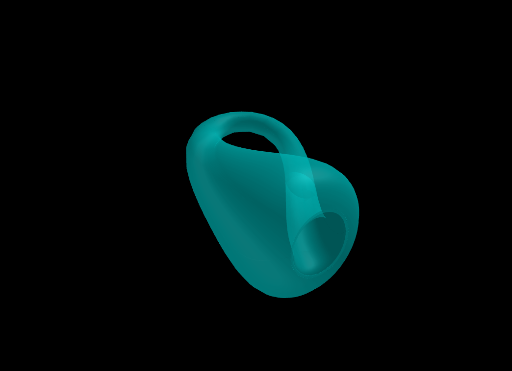
This example demonstrates how to graph a Klein bottle using GeoGebra, showcasing its complex spatial structure through the function exp(...). Core mathematical concepts include function graphing, 3D surfaces, parametric equations, and calculus concepts like derivatives and integrals. Construction highlights from the summary involve commands/objects such as Derivative, Root, Surface, and Segment. Suitable for high school and above learners to understand complex geometric bodies and function graphing techniques.
GeoGebra Commands & Parameters
Derivative(fx) → fx'Derivative(fy) → fy'Root(fy', 3) → ASurface(fx(u) + ((fr(u) * cos(rotZ(u))) * cos(v)), fy(u) + ((fr(u) * sin(rotZ(u))) * cos(v)), (fr(u) * sin(v)), u, 0, U, v, -3.14159, V) → s1Segment(A, (x(A), rotZ(x(A)))) → a
AI Drawing Prompt Reference
Draw a 3D Klein bottle, start by calculating the derivative of the function and finding the root of a specific derivative. Then use parametric equations and rotation functions to construct the bottle's surface. Finally, connect the root point to the rotated point with a line segment. Adjust the ranges of parameters u and v to fully display the bottle.
The prompt above was compiled from the original drawing commands and is for reference only.