
Kite/Rhombus Area Exploration 2
Loading the math board and drawing, please wait…
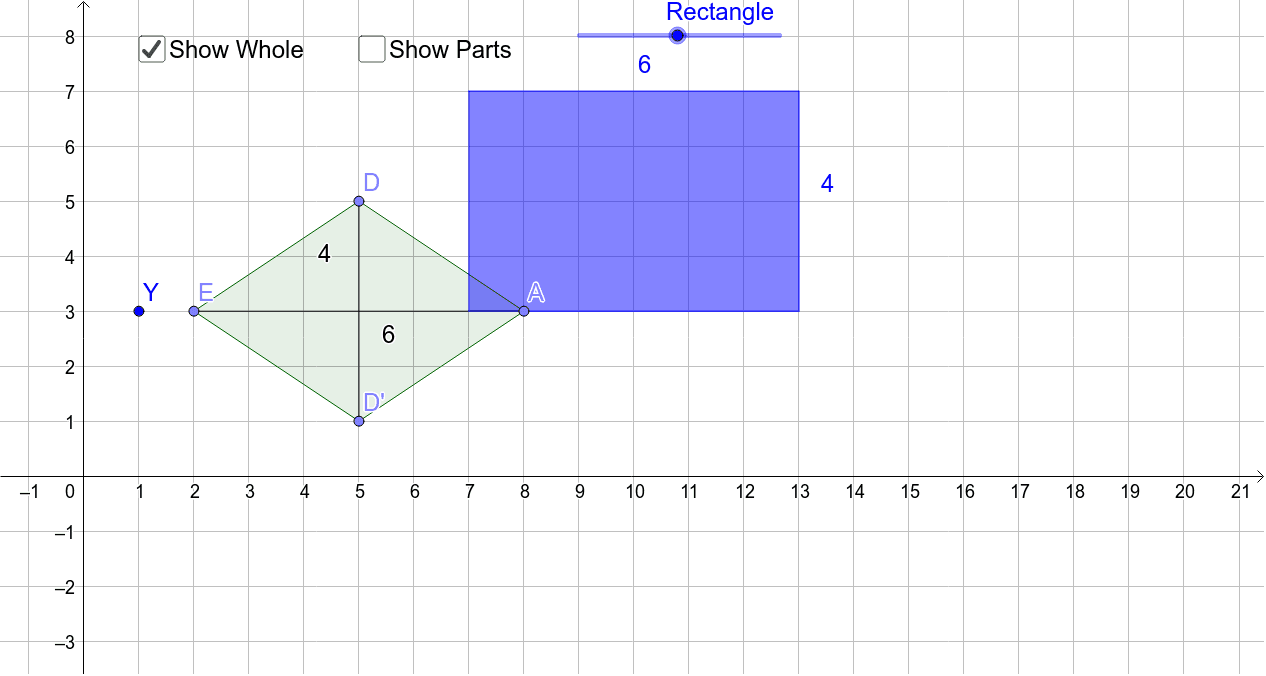
This GeoGebra example demonstrates the area relationships of kites and rhombi through dynamic construction. It visually explores how the area of these quadrilaterals depends on the product of their diagonals, leveraging the perpendicular diagonal property. The construction uses commands such as Line, Point, OrthogonalLine, Mirror, Segment, Polygon, and Intersect to build symmetric figures with axes, perpendiculars, and reflected points, forming polygons poly1 and poly2. Interactive elements like sliders or buttons allow users to manipulate dimensions and observe changes in area. This resource is ideal for middle or high school geometry classes, supporting lessons on quadrilateral classification, symmetry, and area formulas, while also offering extensions into limits, linear regression, and tangent line concepts.
GeoGebra Commands & Parameters
Line(Y, Z) → aPoint(a) → COrthogonalLine(C, a) → bPoint(b) → DPoint(a) → EMirror(D, a) → D'Segment(D, D') → cPoint(a) → APolygon(D, A, D', E) → poly1, d, a_1, d', eSegment(E, A) → fIntersect(c, f) → BSegment(D, B) → gSegment(A, B) → hSegment(D', B) → iSegment(E, B) → jPoint(Circle[F, f]) → GSegment(F, G) → mPoint(Circle[F, c]) → HSegment(F, H) → nPoint(Circle[H, f]) → ISegment(H, I) → pPolygon(F, G, I, H) → poly2, f_1, g_1, i_1, h_1