
Kite Geometry Demonstration by BenMarysiukk
Loading the math board and drawing, please wait…
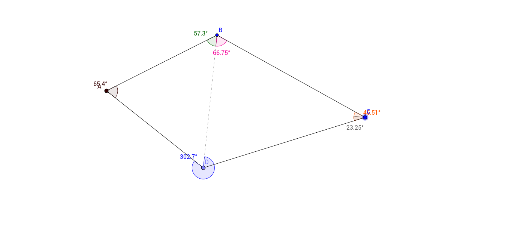
This example demonstrates the geometric properties and rotational transformations of a kite. It involves core concepts like congruence, quadratic functions, geometric distribution, rotation, and exponential functions. Construction highlights include Circle, Point, Segment, Intersect, and Angle commands in GeoGebra. Suitable for high school mathematics education to understand geometric transformations and function graph relationships.
GeoGebra Commands & Parameters
Circle(A, zz) → cPoint(c) → DSegment(A, D) → fCircle(C, D) → dIntersect(c, d, 2) → BSegment(A, B) → gSegment(B, C) → hSegment(C, D) → iSegment(D, B) → kAngle(A, B, D) → αAngle(A, C, D) → βAngle(A, D, B) → γAngle(D, B, C) → δAngle(D, C, B) → εAngle(D, A, B) → η
AI Drawing Prompt Reference
Draw a geometric kite shape involving two circles and their intersection points, along with the segments formed. Start by creating a circle centered at a point, find the intersection points with another circle, and connect these points to form the kite's sides. Then, calculate and label the angles between the vertices to demonstrate the kite's geometric properties and rotational symmetry.
The prompt above was compiled from the original drawing commands and is for reference only.